
Your website needs a goose.
Security
Honk! Your .env file can be downloaded by anyone.
It can hold your passwords and keys. Your security grade fell to D.
See who comes to your website, how fast it runs and what’s trying to break in. Analytics, page speed, security and a firewall in one dashboard, with error logging, uptime, SEO and forms built in.
Free for three sites, no card needed. The demo is a made-up shop with made-up visitors, nothing to sign up for.
Most websites need five or six tools. SiteGoose is one.
One tag, one login, one bill. Pick a part to see the real screen; each has its own page with the whole story.
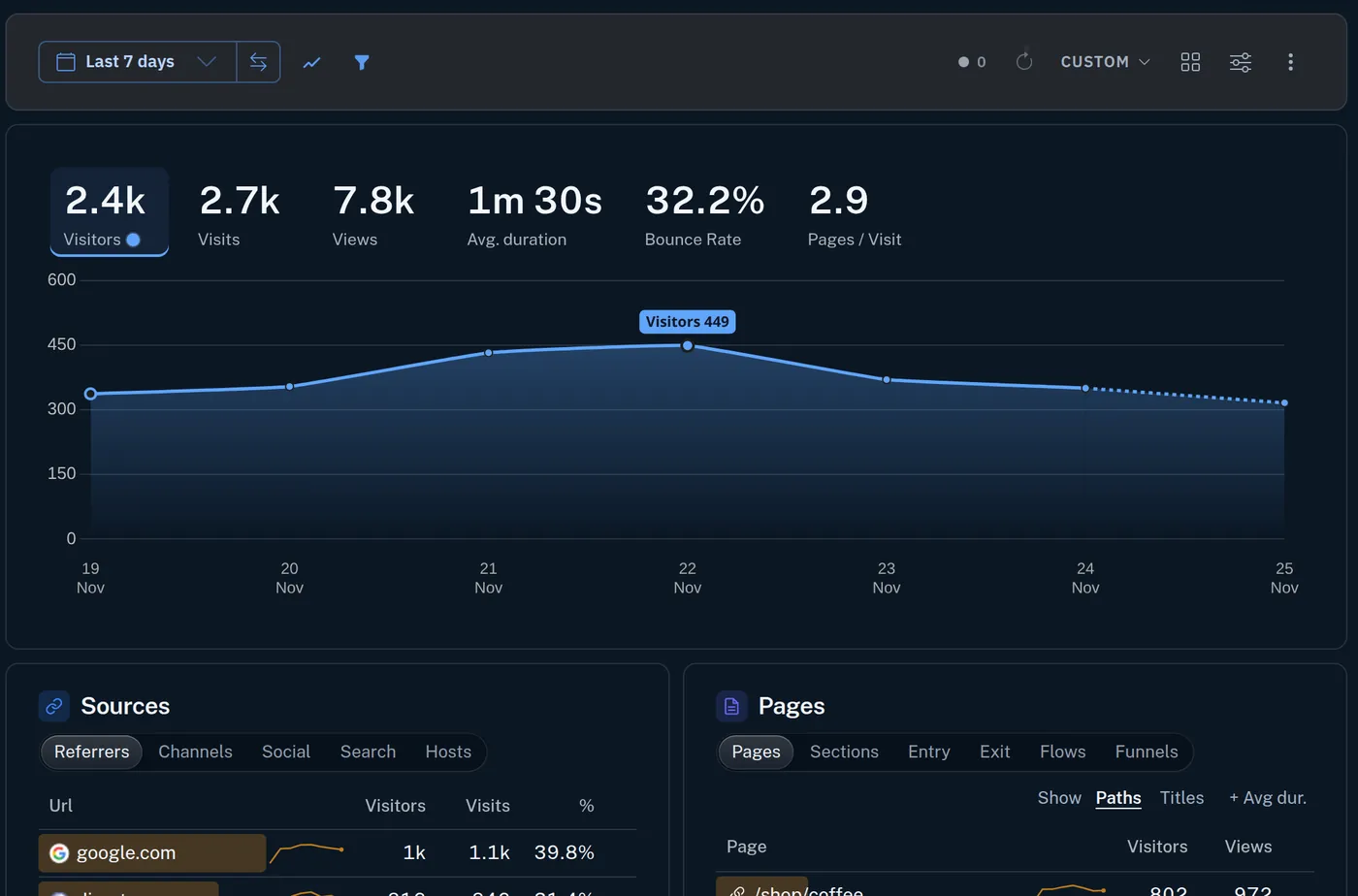
Exact numbers you can read at a glance.
Does the job of GA4, Plausible or Fathom.
- Click any row A source, a page, a country: the whole dashboard follows it. Or leave it out with one click.
- Click a day on the chart The sources, pages, countries and events that were different, and whether conversion fell because traffic changed or because people bought less.
- Click a page Its traffic, speed, errors, Google figures and every finding from our checks, in one panel. Assign a finding or mark it fixed.
- Read the sentences Up to 8 plain Insights on what’s moving, each marked by how sure we are, with a next step. No AI.

Real numbers from real phones.
- Real-visitor speed Core Web Vitals by page, device, browser and country, and a plain warning when there are too few page loads to trust.
- Does speed cost you? Whether slow pages lose you conversions, so you know if a fix pays.
- A fix list for developers Slow scripts, elements that shift, missing compression and caching, and the recent slow loads behind them.
- Page by page Each page’s problems worst first. Assign one, mark it fixed, and the next check confirms it.
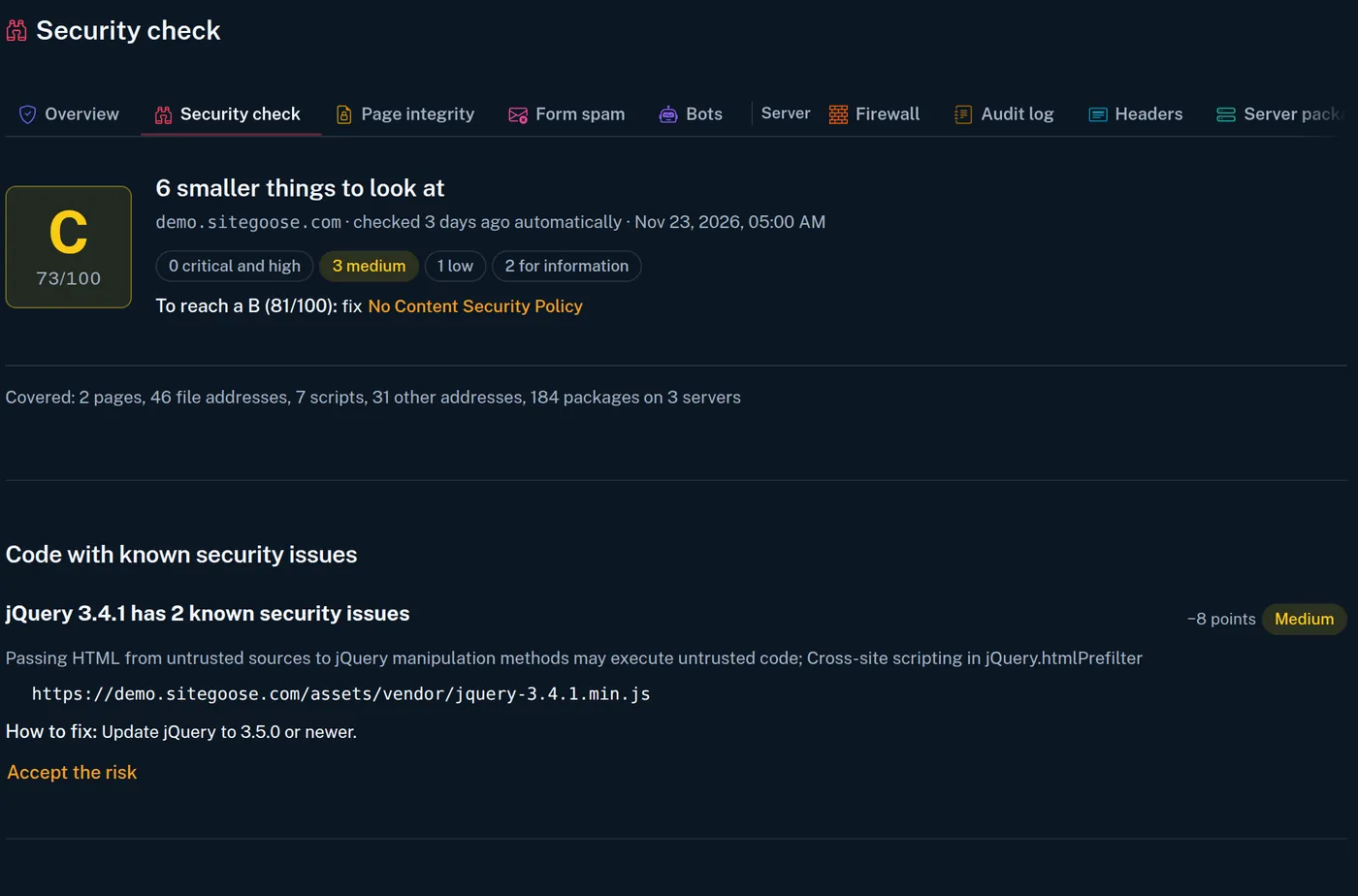
An A to F grade your whole team can understand.
Does the job of a website security scanner.
- Files that shouldn’t be public 22 paths such as .env, .git and backups, judged by what’s in them.
- Developer leftovers Secret keys in the code browsers download, open GraphQL, CORS and stack traces.
- Vulnerable code The scripts your real visitors loaded, matched against known holes.
- Your packages npm, PyPI, Packagist and more, each hole with the command that fixes it.
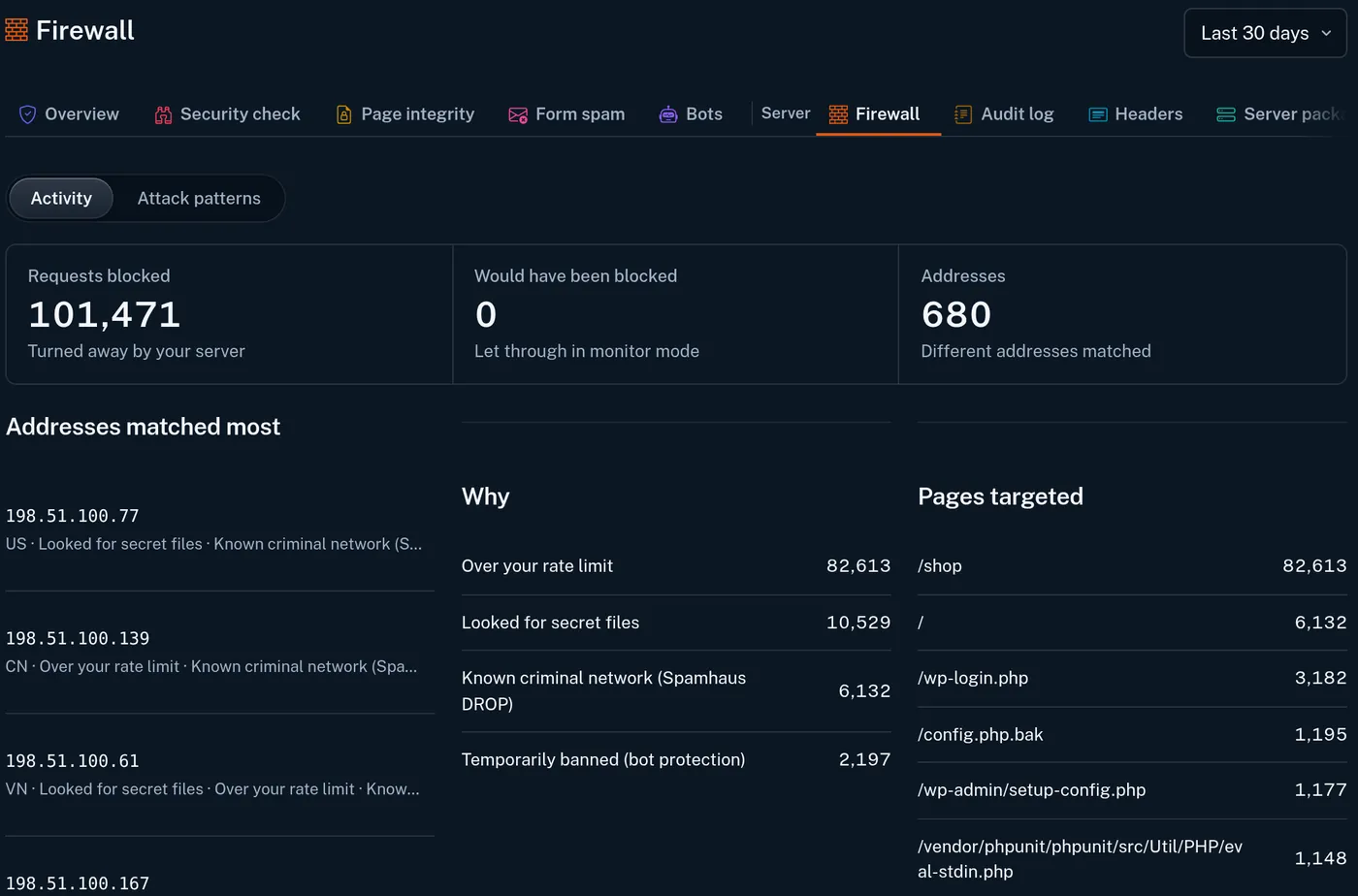
Keep the bad traffic out.
Does the job of a WordPress firewall plugin.
- Watch first, then block It starts by watching and shows what it would have blocked. Switch it to block when you’re ready.
- Allow and deny lists Plus Spamhaus lists and rate limits, inside your own app, on any stack.
- Attack patterns 21 rules for the usual probes, each off, monitor or block.
- Automatic bans Login floods, failed logins and probes answered without you.
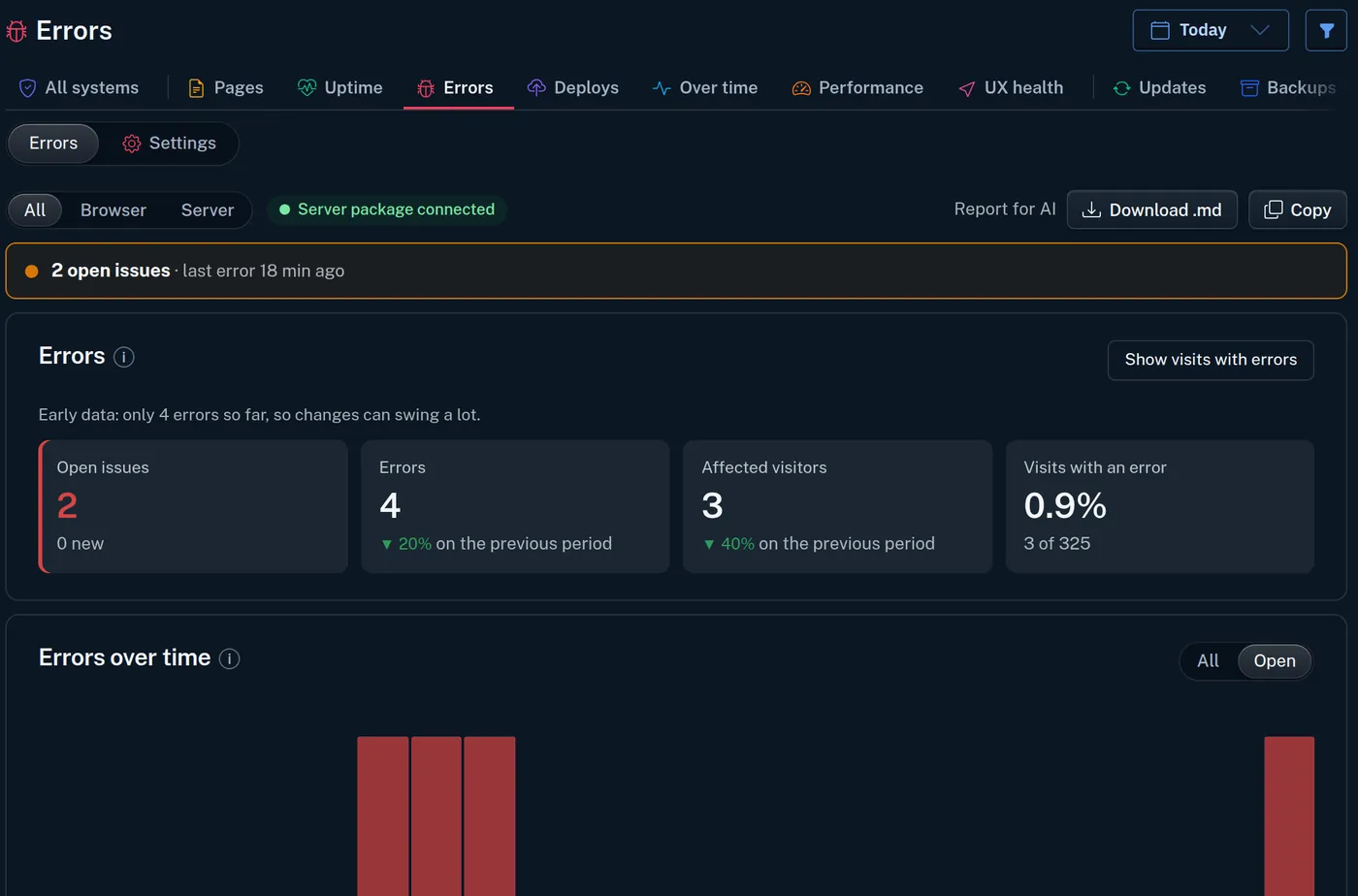
Front-end and back-end errors, in one place.
Does the job of Sentry.
- One issue per bug Repeats grouped into one issue that survives deploys, marked New or Regressed.
- An email, not a flood A new error emails you automatically, at most once an hour per site.
- What it cost Visits that hit an error against clean ones, on conversions and revenue, so you fix the costly one first.
- Server errors too Beside the browser’s, linked to the same visit, plus routes that failed and logged nothing.

Know when your site stops answering.
Does the job of UptimeRobot or Pingdom.
- Every minute Every 5 minutes on Free. A failed check is tried again 15 seconds later before it counts.
- “Up but broken” caught Fails if a phrase such as “Add to cart” goes missing from the page.
- Your API, shop and login too 1, 10 or 25 monitors a site.
- Honest when it can’t see If Cloudflare or another filter answers instead of your site, we say so.
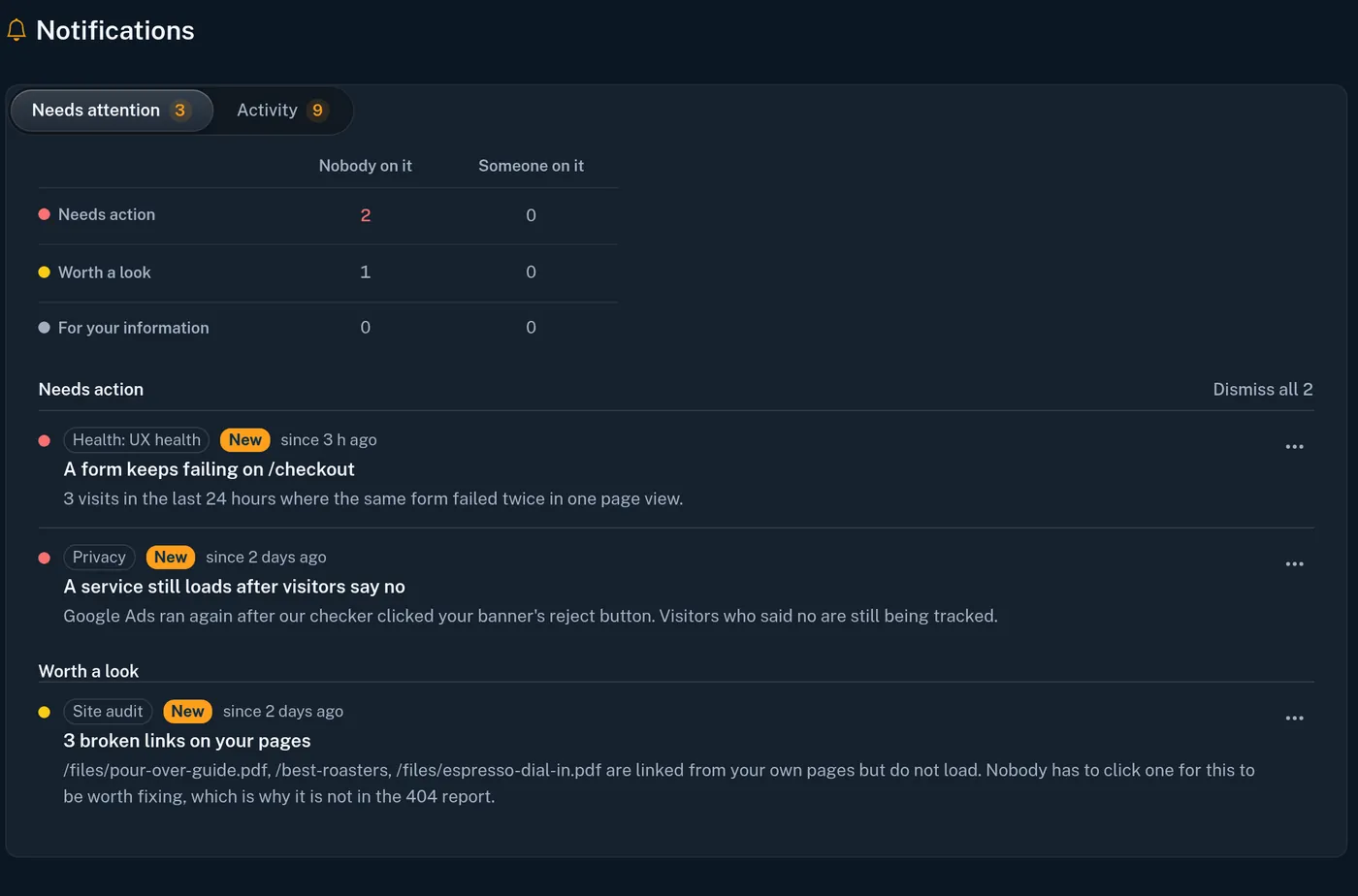
One list of what needs you.
- 27 kinds of alert Each with its own email and webhook switch, so you choose what reaches you.
- Slack and Discord Webhooks that land in your team’s channel.
- Ranked by money at risk The list puts what costs most first, and clears itself once it’s fixed.
- Unusual traffic The last day against the same hours in past weeks, checked every 15 minutes.
Ask Claude about your site.
- One step per app Paste one address or run one command, then sign in. No key to copy.
- You pick the sites It reads only the sites you tick, as your role sees them.
- Cut it off any time Disconnect it from your profile whenever you like.
- Visitors and conversions Traffic, sources, pages, funnels and goals, with the dashboard’s filters.
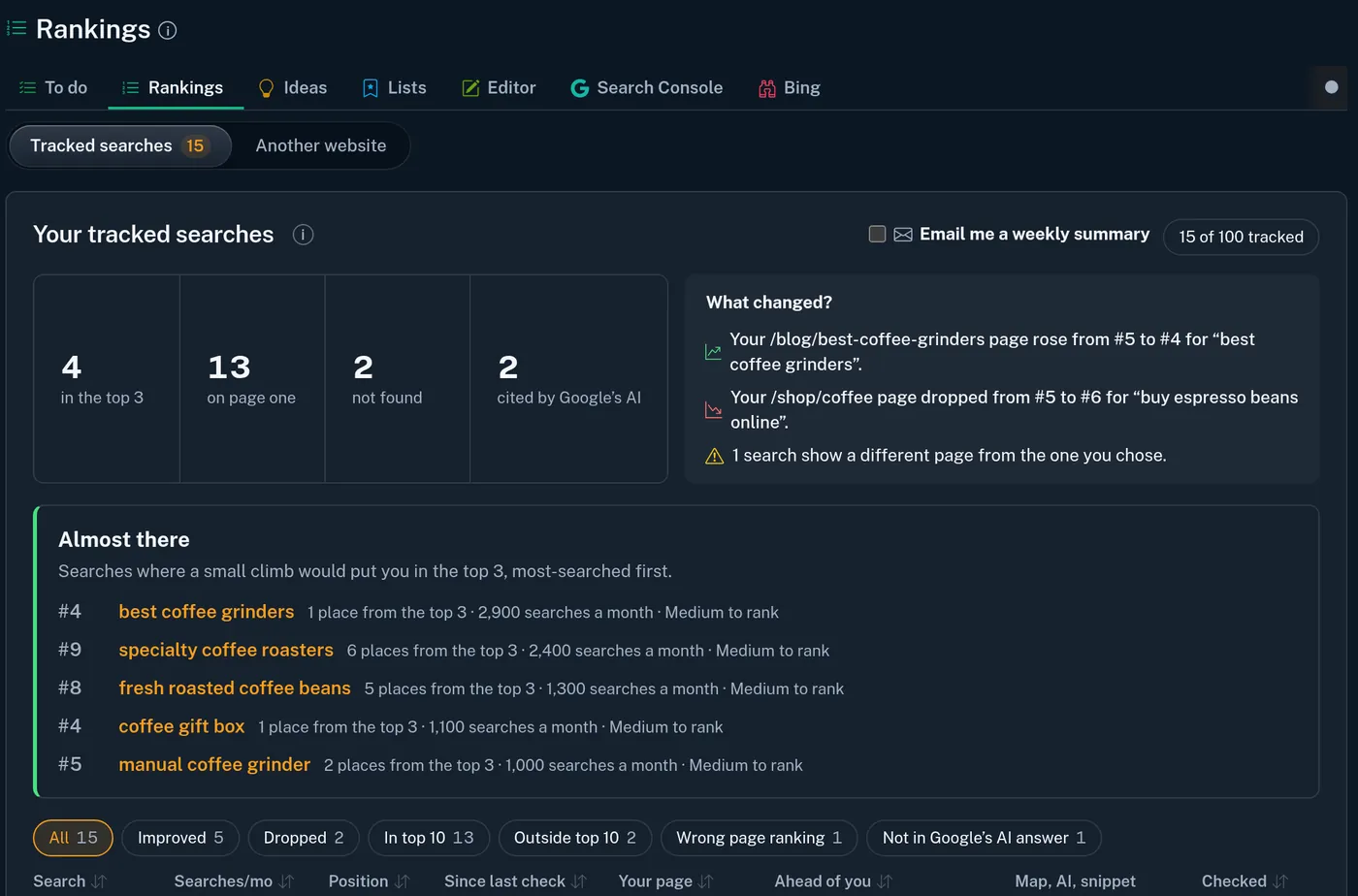
See how you’re found, on Google and in AI answers.
Does the job of Ahrefs or Semrush.
- Site audit 39 checks, a score out of 100, and what’s new and fixed since last time.
- Robots, sitemaps and hreflang 32 more checks, free with every audit.
- Search Console 16 months of clicks and positions, joined to your own visits and sales.
- Almost on page one The pages closest to page one, and the ones rarely clicked: the quickest wins.

See where people get stuck.
Does the job of Hotjar or Clarity.
- Record what matters By page, event, rage click or funnel step, with the pages before it kept.
- From any report The recordings behind a funnel step, a form field, a heatmap element or an error, one click away.
- Pay only for what’s kept A visit counts only once it qualifies for recording.
- Private by default Typing is never recorded, and checkouts and logins are skipped.

Traffic is nice. Customers pay the bills.
Does the job of a separate A/B testing tool.
- Goals A page, a button, a form sent, a download or an event. Counted on your past visits too.
- Pick on my site Click the button on your own site and the goal is made, with no code.
- Revenue by source Revenue, buyers and value per visit, on the visit that bought or the first visit of the day.
- Shop and ads Cart abandonment, top products and coupons, and what each ad campaign cost against what it brought.
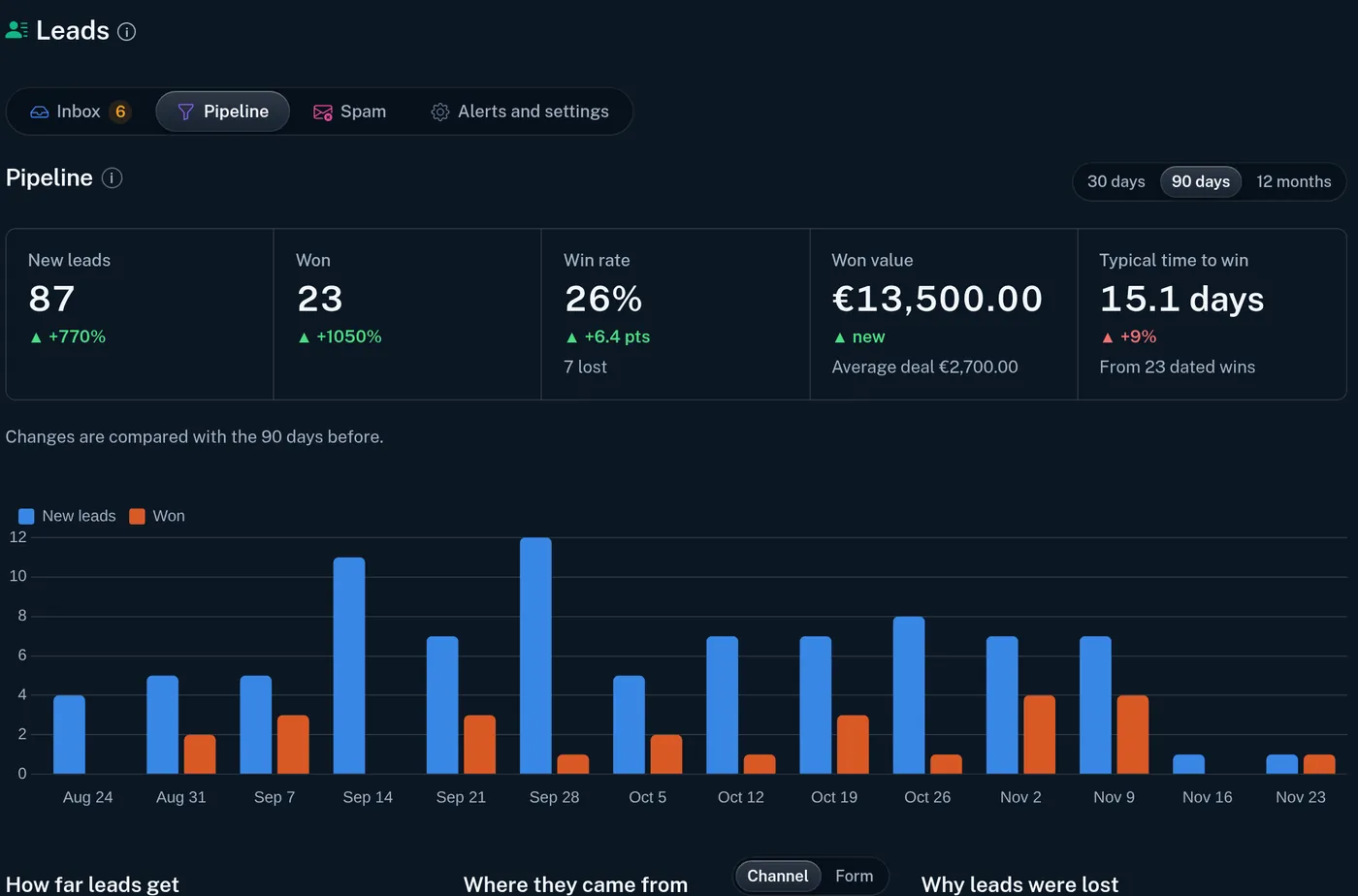
A new enquiry lands, and you can see where it came from.
Does the job of Typeform or HubSpot Free.
- Form builder 14 starting points and 12 field types, as a popup or in the page.
- The right moment After a delay, on scroll, on exit intent, after an event or from a floating button.
- Forms that fit the person Show, require or route a question by answer, amount, country or device.
- Call-back button A floating “Request a call”, one tap for a phone lead.
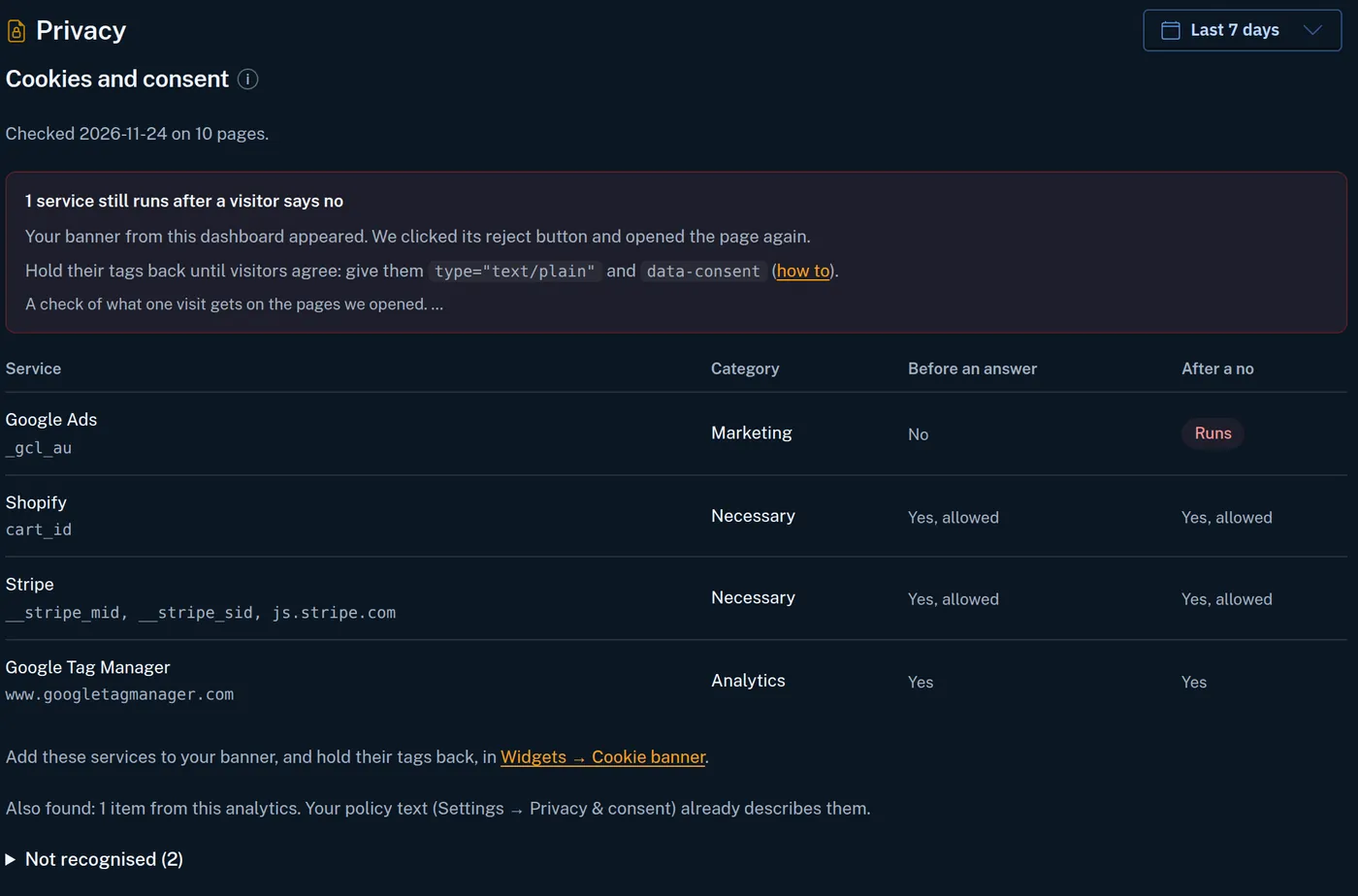
GDPR-friendly from the start.
Does the job of Cookiebot.
- Accept, decline or choose Four categories, and the tags you mark are held back until a yes.
- Ask only where you must Europe alone, or with Brazil, Canada, South Korea or India.
- A consent log Every answer kept, with an ID a visitor can quote.
- What your site runs The cookies and services the tracker saw on your pages.
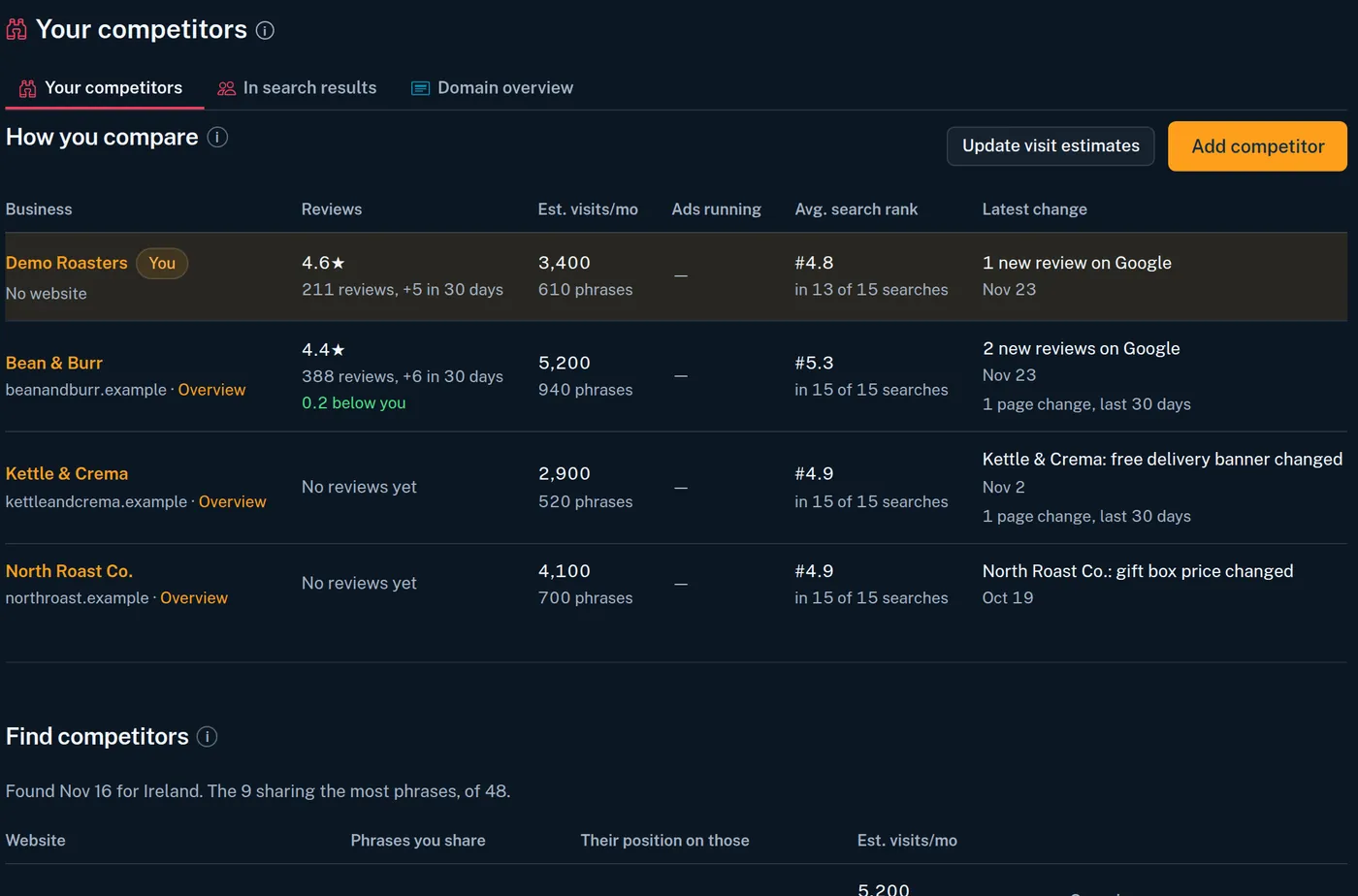
Know when a rival moves.
- Up to 25 rivals a site Their rating, estimated traffic and latest changes in one table.
- Who beats you on Google Sites that keep showing up in your searches, and how often they’re above you.
- Their history, from day one Positions from your past checks, so a rival added today already has a history.
- Page watches Prices, text, sitemaps, RSS and DNS, checked every 6 hours to weekly.
Real screens from our demo shop with made-up visitors. What you get depends on your plan, and some of it needs a small install. Open the demo and click around
Not just combined. Working together.
Every part knows what the others know. Pick a moment you’ve had.
Your numbers dropped on Tuesday.
See that your site went down that morning, and what it cost you.
- AnalyticsThe visitors chart dips on Tuesday.
- UptimeThe same chart marks the outage that morning.
- ConversionsThe outage shows the visits and sales it cost.
People look around, then leave.
See where they gave up, then watch the recordings to find out why.
- FunnelsThe funnel shows the step they leave at.
- HeatmapsThe heatmap shows where they clicked instead.
- RecordingsThe recordings show them giving up.
Something breaks on your site.
You get an alert. See the error, then watch someone hit it.
- AlertsAn email: a new error on your checkout.
- Error loggingThe issue shows your original code and the clicks before it.
- RecordingsWatch the visit that hit it, from the moment it broke.
Your site feels slow.
See if it’s really putting people off, so you know it’s worth fixing.
- Page speedReal visitors’ load times, page by page.
- ConversionsSlow visits set against fast ones, on sales and sign-ups.
- ServerThe route, query or full disk behind it.
Your visits jumped last week.
See what changed on your site that day, so you can do more of it.
- AnalyticsClick the day on the chart.
- SourcesSee the source, page and campaign behind it.
- DeploysSee the release that went out that day, marked on the chart.
What it does for you
The same product does a different job for each person. Pick the one closest to you.
Know your website’s working, without learning analytics.
- See plainly how many people came, where from, and whether they got in touch.
- Plain sentences tell you what changed and what to do next, so you don’t have to read tables.
- Every enquiry in one inbox, with where the person came from, and a nudge before one goes cold.
- If the site goes down, a certificate is about to expire or your domain is close to lapsing, you hear about it.
- Ask a question in your own words and get an answer from your own numbers.
- Paste one tag. A check confirms it’s working within seconds.
Best plan: Free to start, Basic to grow.
See what’s bringing in money, and what’s quietly losing it.
- Revenue by source, not just traffic, and each ad campaign’s cost against what it brought.
- Cart abandonment, a shopping funnel, top products, and which discount codes became orders.
- Find the checkout step people give up at, see where they went instead, and watch the recordings.
- A list of every script on your payment pages, with a warning when a new one appears, which is how card skimmers get in.
- See an error on a product page, what it cost, and the recording of the person who hit it.
Best plan: Basic to start. Revenue reporting is on every plan, Basic adds a few replays and heatmaps, and Pro gives you ten times as many.
Find out which work actually worked.
- See every source of traffic, including AI assistants, and click one to see only those visitors.
- Tracking links and QR codes for every post, poster and email.
- Compare against last week, last year, or another group of visitors over the same dates.
- Funnels show exactly where people give up, with recordings of the people who did.
- Test a headline in a visual editor, see the result in revenue per visit, and keep the winner.
Best plan: Pro.
Your rankings, keywords and backlinks in one place.
- Track phrases on Google by country, town, language and device.
- See pages that are slipping, and pages almost on page one.
- Open any page and see its clicks and position on Google beside its speed, errors and audit findings.
- See whether ChatGPT, Gemini and Google’s AI Mode mention you, and who they recommend instead.
- Get a count of the topics pages above you cover and yours doesn’t.
Best plan: Any plan for rank tracking, paid by credits. Pick by how many credits you’ll use.
Errors, server speed and security in one small package.
- Full stack traces with source maps, the steps that led to each error, and the release that brought it in.
- Send an error to GitHub, GitLab or your AI assistant in one click, and see it reopen if it comes back.
- Catch the failures your code hid and never reported.
- Typical and slow response times per route, and the queries behind them, beside your traffic.
- Dependencies checked for known holes, with the command that fixes each.
- A read API with a key for each site, and packages for Node, Python, PHP, Ruby, Java, .NET and Go, with Laravel, Symfony, Rails, Spring Boot and WordPress included.
Best plan: Basic for errors and a few replays, Pro for more replays.
All your clients, one list of what needs you today.
- A single worklist across every site, ranked by the money at risk.
- A security grade per site, with the fixes for the next letter and a report to send the client.
- PDF reports in one click, and frozen links so a report stays as you sent it.
- View-only client dashboards with a password and an expiry date.
- One person is one seat, however many sites they work on.
Best plan: Pro.
See how you show up when someone nearby searches.
- Rank checks for your town, with your map position, rating and review count.
- Watch nearby rivals’ prices and pages, and get told when they change.
- QR codes for flyers, so offline work gets counted too.
- Every enquiry in one inbox, with where the person found you.
- Hear about it if your site goes down or your domain is close to lapsing.
Best plan: Basic.
One plugin for analytics, errors, firewall and file checks.
- Install a zip with your site’s settings already in it. No code.
- WooCommerce orders flow in by themselves, counted once, ad blockers or not.
- Get told if your WordPress files change, checked hourly against the official copies.
- See who changed what, from logins to plugins.
- A firewall inside your own site, watching first and blocking once you say so.
Best plan: Basic. The plugin is a download, not a WordPress.org listing.
What’s different about it
- A script that can’t be swapped
- The code you paste carries a fingerprint of our script. Your visitors’ browsers check it, and every file it loads, and won’t run a copy that was changed, even one changed on our own servers.
- Exact numbers
- Your headline numbers are counted, not estimated, on every plan.
- Real maths, not AI guesses
- When we tell you what changed, we also tell you how sure we are.
- Honest about what it doesn’t know
- If we can’t check something, we say so. We never call it a pass.
- Ask your AI assistant
- Connect Claude, Cursor or VS Code and ask about your site in plain words. It reads the same numbers you see.
- See how AI treats you
- What AI says about you, and what visitors it sends you.
- We say what it costs you
- An outage, an error or a slow page comes with the visits and sales it cost, so you know what to fix first.
Paste one tag. See your first visit in seconds.
Paste one tag
Or install the WordPress plugin. There’s a guide for your platform, from Shopify to Google Sites.
See your first visit
We show you the moment your first visit arrives, so you know it worked.
Let the goose watch
Uptime and domain checks need no install at all. Add a small install later if you want the firewall.
Start free. Pay when you grow.
Free
$0
- Three sites, 50,000 pageviews and events a month
- Every report, and uptime every 5 minutes
- A security check graded A to F every month
- Forms and a leads inbox, 100 replays and 20 heatmaps a month
Basic
From $9 a month
- 20 sites, uptime every minute
- Unlimited leads, errors kept 30 days, the API
- 1,000 replays and 200 heatmaps a month
- Every SEO tool, with search credits each month
Pro
From $29 a month
- Unlimited sites
- Unlimited A/B tests and site edits
- The sales pipeline and client dashboards
- 10,000 replays and 2,000 heatmaps a month
Prices are for 100,000 pageviews and events a month and rise with your traffic. Yearly billing charges 10 months for 12.Compare every plan
Questions people ask
Do I need a developer?
No. Paste one tag, or install the WordPress plugin. A check confirms it’s working in seconds. Some server features use a package your developer can add.
Could someone change your script and attack my site through it?
Not with the code we give you. It is locked to one version by a fingerprint, and browsers refuse to run a script, or any of its parts, that doesn’t match it. A released version is never changed. To move to a new one, you copy the new code.
Will it slow my site down?
It loads after your page has finished loading, and extra features only download when you turn them on.
Do I need a cookie banner?
Not for SiteGoose analytics in our default “No cookies, no banner” mode. If you turn on recordings, or run other tools that need consent, our cookie banner is included on every plan.
Do you use cookies?
We don’t set cookies of our own. By default, counting your visitors stores nothing in their browser at all.
Can you track someone across days?
Not by default. Visitor IDs change every day, and the key that makes them is thrown away. Features such as returning visitors use a lasting ID, which you can switch on with consent.
Do you store IP addresses?
Not with your analytics. We use them briefly to work out location and the daily ID. The firewall and audit logs do keep addresses, because that’s what they’re for.
What happens if I go over my limit?
Free stops counting at 75,000 events and starts again next month. Paid plans keep collecting, and we ask you to upgrade if you stay over.
What happens when I leave?
Delete a site and its data is erased. Download it first: every day as CSV, and on Basic and Pro every hit too.
Can I change my domain?
Yes. A site keeps everything when its domain changes.
Is there a free plan?
Yes. Three sites, 50,000 pageviews and events a month, uptime checks and alerts, and a security check of your site every month. No card needed.
Are the SEO tools included?
Yes, every one of them, on every plan. Rank checks, keyword ideas, backlinks and AI answers use search credits, and Basic and Pro include some each month. If you use more, the SEO add-on gives a bigger monthly allowance, so heavy search use is paid for by the month, not by moving plan. Search Console uses no credits at all.
Put a goose on your site.
Free for three sites, no card needed.