
Alerts and your to-do list
One list of what needs you.
Everything that needs a look, across all your sites, in one list with what costs most at the top. Take a problem on and the team sees it’s yours. Fix it and it drops off by itself. You choose what reaches you by email or in your team’s chat, and when.
- 27
- kinds of alert, each with its own email and webhook tick
- 15 minutes
- between checks for unusual traffic
- 90 days
- of activity kept for each person
- 100,000
- rows in each CSV export
What you get
Anything without a plan label comes with every plan, including Free. The pictures are the real dashboard, from our demo shop with made-up visitors.
Your to-do list
One place to look each morning.
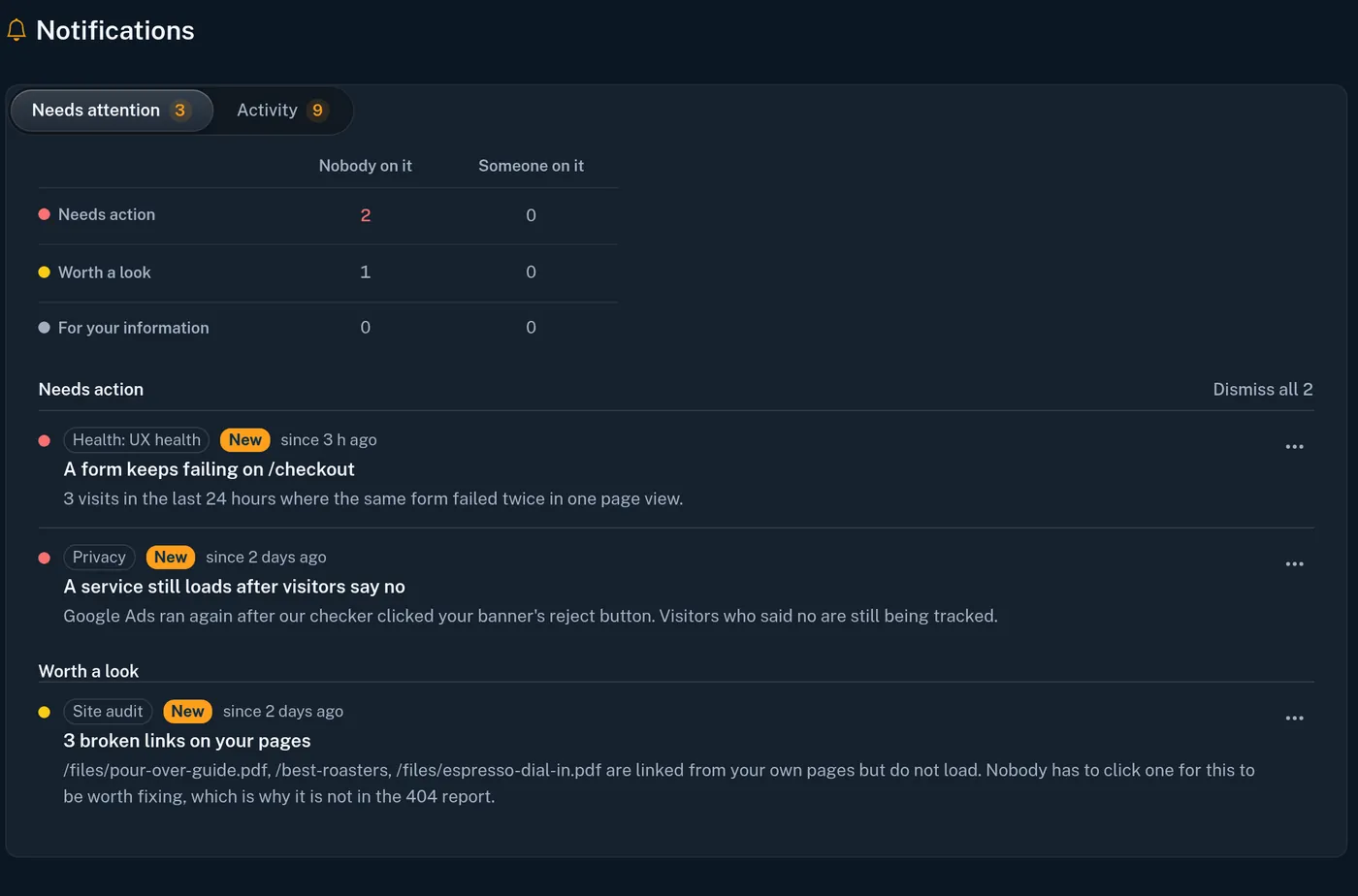
Needs attention puts every site’s problems in one list, ranked by the money at risk. Alerts about one fault, the site down and the errors and the traffic drop that came with it, show as one problem. Say “I’m on it” and nobody else is chased about it. Fix it and it clears itself, so what’s left is what still needs you.
The list
- Ranked by money at risk What costs most comes first, under Needs action or Worth a look.
- One fault, one problem Alerts that arrive together are grouped, with a possible cause and how strong the evidence is.
- Nobody on it A count at the top of each priority, split by whether someone has it. Click one to see only those.
- Clears itself Once a problem is fixed, it drops off. Nobody has to tick it.
- Opens on your site The list opens on the site you’re in, with the rest of your sites a click away and a count of what waits there.
Act on one
- I’m on it Tells the whole team the problem is yours, in the list and from the alert email. “Not me any more” hands it back, and anyone can take it over.
- Snooze or dismiss Hide it until tomorrow, or until it comes back or gets worse. Only for you: the team keeps theirs.
- Silence a kind “Stop showing me this” on one site or all of them. The rest of the team still gets it, and you can undo it in your profile.
- Activity A 90-day log of everything that happened, newest first, so nothing’s lost even with email off.
Your own watches
- Tell me if this moves Your own watch on a number. It shows in your list only, no email.
- Your own rules From Basic planWatch 7 numbers, hourly or daily, with your own limits.
- Upkeep Recurring tasks from 44 ready-made checklists, put on as many sites as you like. What’s due turns up in your list.
How you hear
Email, Slack or Discord. Your choice, alert by alert.
Each kind of alert has its own email tick and webhook tick, so the site going down can reach your phone while a slipping page waits for the morning. Each person then picks when their own email comes: at once, in a daily or weekly digest, or after their quiet hours.
Where alerts go
- 27 kinds of alert Each with its own email and webhook switch, and who on the team gets it.
- Slack and Discord Webhooks as HTTPS JSON that land in your team’s channel. Several for one kind of alert, each with its own Send test.
- Nothing lost if your end is down Every webhook is signed, tried again for about a day, and listed with what your server answered and a Resend button.
- An email, not a flood A new error emails you at most once an hour per site.
- No false “down” A failed check is tried again 15 seconds later, and it takes 2 failures to make an outage.
When it reaches you
- At once or in a digest Per kind of alert: traffic dips and slipping pages in one email a morning, while the site going down comes at once.
- Quiet hours The hours your alert email waits, in your own time zone. “Site down” can still get through. One email when they end: what still needs you, then what sorted itself.
- Stop emailing me this At the foot of every alert email. That kind stops reaching you, and only you.
- A Monday summary One email a week: each site’s uptime, jobs, new errors, security grade and expiry dates, and either “all clear” or what needs you.
Planned work and nights
Alerts that are real, and reach someone.
A deploy shouldn’t email the people doing it, and a 3am outage shouldn’t sit in one inbox until morning. Pause alerts for planned work, pass a problem on when nobody takes it, and set the lines at which your server checks count.
Pause for planned work
- Pause now For up to 24 hours, with a note of what the work is.
- Booked ahead or every week A one-off window, or a weekly one such as Sundays 2 to 4am.
- From your deploy script One call with the site secret pauses alerts, another resumes them. Maintenance mode pauses them too.
- Nothing hidden after Your list still gets everything while paused. When it ends, anything still wrong is sent, and a site that went down and came back is only listed.
When nobody picks it up
- Pass it on Up to three steps: after so many minutes with nobody on a problem that needs action, email these people.
- Never while paused Steps wait while alerts are paused, and each person’s quiet hours still apply.
Your own alert lines
- Worth a look, needs action Two values for each server check: slow responses, server errors, database locks, the oldest job in a queue, disk, load and more.
- Defaults shown beside them So a disk that always sits at 85% stops raising alerts nobody acts on.
What sets one off
The things you’d want to know before a customer tells you.
Outages and errors, of course. But also the quiet failures: a form people stop sending, a page sliding down Google, a script that wasn’t on your checkout yesterday, a release followed by trouble.
Your site
- Down, and back up An email when your site stops answering, and another when it’s back.
- Up but broken A phrase such as “Add to cart” goes missing from the page.
- Certificate and domain A warning 30, 14, 7 and 1 days before either runs out.
- Page changes A new script host, or a form rewritten to send somewhere else.
- Payment page scripts From Basic planA new script on your checkout that you haven’t approved.
- A login from somewhere new Needs an installAn admin account signing in from a country or browser it never used.
- Late or failed jobs A backup or cron job that didn’t run on time, or said it failed.
- A release that went wrong A release followed by new errors, the site going down or sales falling. Once per release.
Your server Needs an install
- Slow or failing The server slowing down, server errors rising, the database at its limits or a job queue stuck, checked every 5 minutes.
- About to fall over From Basic planVisitors being turned away, a process killed for memory, and a disk due to fill within 2 days.
- A flood From Basic planWhen a flood of fake traffic starts and when it’s over, with what was stopped.
Your visitors
- Unusual traffic The last day against the same hours 1 to 3 weeks back, checked every 15 minutes.
- Outside the usual range A day outside the expected range, or a month off pace.
- One part moving on its own Top sources, countries and pages judged against their own 8 weeks, so “Germany tripled” shows while the total looks normal.
- Forms nobody sends People start a form and stop. No error is thrown, so most tools miss it.
- Pages slipping in Google Pages losing clicks or dropping 3 or more places. Needs Search Console.
- Conversion drops A drop linked to a release, an error or a page change close to it.
- No visits for a day A site that has visitors every day gets none for a whole day, or a connection fails. Never on a quiet or test site.
Reports and sharing
Numbers for people who don’t log in.
A PDF in one click or in the inbox every week, a link that never changes, or a live dashboard a client can open without an account. And your data comes out whenever you want it.
Reports
- PDF reports In one click, from 3 presets, with the period before beside it and sharp charts.
- Emailed reports From Basic planDaily, weekly or monthly at the hour you pick, with the PDF, for up to 30 people.
- Your branding From Basic planYour name, logo, accent colour and footer on the PDFs and report emails.
- Frozen report links From Basic planA stored PDF that never changes, so what a client opens in June is what you sent in March. 50 a site.
- Shared dashboards From Pro planView-only and live, with a password, an expiry date and a download switch. 50 links a site.
Your data, out
- CSV export 32 sections, up to 100,000 rows each.
- Download all your data Every day your site has kept, as a ZIP of daily CSV files in Plausible’s format. We tell you when it’s ready.
- Every hit From Basic planEvery page view, click and event as monthly CSV files, for your own spreadsheet or warehouse. The site’s owner only.
Questions people ask
Will I get a pile of emails when something breaks?
No. Alerts about one fault show as one problem. A new error emails you at most once an hour per site, and a failed uptime check is tried again before it counts. You pick which kinds email you at all, and which wait for a daily or weekly digest.
Can two people end up fixing the same thing?
Not if one says “I’m on it”. The whole team sees who has the problem, and nobody else is chased about it. If nobody takes a problem that needs action, it can be emailed on to the next person after the minutes you set.
Can I stop alerts during a deploy?
Yes. Pause them now, book a window ahead or every week, or pause from your deploy script. Your list still gets everything, and anything still wrong when the pause ends is sent then.
Can alerts go to Slack or Discord?
Yes. Add a webhook and alerts arrive in your team’s channel. Each kind of alert has its own webhook tick, as well as its own email tick.
Do you send text messages?
No. Alerts come by email, to your webhooks and into your list in the dashboard.
Can a client see the numbers without an account?
Yes. Email them a report with your logo on it, or send a frozen PDF link, on Basic, or share a live, view-only dashboard with a password and an expiry date on Pro.
Put a goose on your site.
One list, the alerts you chose, and someone on every problem. See it all