
Site audit
Find what’s wrong with your pages, and fix it in order.
An audit reads your site the way Google does and scores it out of 100, with what to fix first. A weekly crawl adds broken links, missing files, accessibility and the writing on each page. Then every finding lands on one list, page by page, for your team to work through and see confirmed fixed.
The audit is on every plan and uses credits. Its robots.txt, sitemap and AI checks are free. The weekly crawl, accessibility and content checks are on Basic and Pro.
- 39
- checks on each page in an audit, with a score out of 100
- 32
- more checks free with every audit: robots.txt, sitemaps, hreflang
- 10 to 500
- pages an audit reads, by hand, weekly or monthly
- 14
- AI crawlers checked against your robots.txt
What you get
Anything without a plan label comes with every plan, including Free. The pictures are the real dashboard, from our demo shop with made-up visitors.
The audit
A score out of 100, and the fix worth most at the top.
Type your address, pick how many pages, and run it. A few minutes later you have a score, a list of what needs attention from errors down to notices, and the points each fix would add. Click any finding for the pages that have it.
Run it Paid per use
- 10 to 500 pages Pick the page limit. The price is on the button, charged per limit, not per page found.
- Your site or any other Audit a client’s, a prospect’s or a rival’s public site, without adding it as a site.
- Sites built with JavaScript We look at the home page first, for free. If it’s an empty shell, each page is opened with its scripts run, so the audit sees what visitors see.
- Saved reports Every audit is kept, free to open again, with the runs before it.
Read it Paid per use
- The score Each page starts at 100 and loses points for each problem, by how much it hurts crawling, indexing or how the page shows in search. The home page and the pages near it count for more.
- What needs attention Errors, warnings, notices and things to review, each with how many pages have it, how to fix it and the points it would add.
- Scores by topic Crawlability, HTTPS, International SEO, Performance, Internal linking, Markup, On-page and AI search, each scored from its own findings.
- Every check, every page Passed, failed, to review or unverified, for each check on each page. No evidence is never counted as a pass.
- The page’s evidence Its headings, links, canonical, word count, click depth, and whether the sitemap lists it.
Keep it and pass it on Paid per use
- New and fixed Each audit says what’s new and what was fixed since the one before, counted only on pages in both.
- Weekly or monthly Re-run the same audit on a schedule, with what changed in your notifications, and by email if you like.
- Download it A PDF with the scores, each topic and what to fix on which pages, and two CSVs: one row per finding, or one per page.
- Share it by link A read-only copy for a client or a prospect, for 7 to 365 days or for good, without your team’s names.
Can Google and AI read it?
The one setting that keeps a site out of Google, or out of every AI answer.
Most sites that don’t show up have a rule somewhere telling search engines to stay away: a robots.txt line, a sitemap full of dead addresses, a tag left on after a redesign. These checks come free with every audit and name the rule and where it is.
Free with every audit
- robots.txt Its rules read as Googlebot reads them, with what each one blocks.
- Sitemaps Every sitemap checked against the sitemap protocol, with how many addresses each lists.
- hreflang Language versions checked for their codes, their return links and their targets. A single-language site is left alone.
- Google’s verdict Indexed or not, and why, for up to 500 pages, and which rich results Google found. Needs Search Console.
AI search
- AI search score Paid per useBeside the site score: whether AI tools can read and quote the site, not whether they do.
- AI crawlers your robots.txt lets in 14 of them, GPTBot, ClaudeBot, PerplexityBot, Google-Extended and the rest: whole site blocked, some pages blocked, or let in, with the rule.
- Pages AI may not quote Up to 100 pages read for nosnippet and max-snippet:0, which keep a page out of Google’s results, AI Overviews, AI Mode and Copilot.
- Text that needs scripts Paid per usePages whose words arrive by JavaScript, which most AI crawlers don’t run.
- Training is your call Paid per useBlocking a crawler that only collects training data costs your score nothing.
How it looks when shared
- Link previews The card your page makes on Google, Facebook, X, LinkedIn, Slack and WhatsApp, so a broken one is fixed before anyone shares it.
Pages and links
The broken link on the page nobody visits yet.
Visitors find some dead links for you, and we count them. Every week we also walk your own pages and follow the links on them, clicked or not, and read what looks fine in a browser but quietly costs you Google.
Links
- Missing pages visitors reached Each page that doesn’t exist, how often it was opened, and the pages and sites that link there, against the period before.
- Broken links, every week From Basic plan100 pages walked, most-linked first, following every link on them.
Page basics From Basic plan
- Told to stay out of Google noindex in a tag or a header. On the home page it’s the top of your to-do list and an alert. Elsewhere it’s listed to confirm, since thank-you and login pages usually mean it.
- No phone layout A missing or wrong viewport tag, so phones get the desktop page shrunk.
- No character set So accented letters don’t turn to garbage.
- www or not Whether the other form of your address opens and leads to your site, not a copy of it.
Files your pages load From Basic plan
- Files that don’t load Your own scripts, stylesheets and images that fail, with the pages using each. A missing script can stop a button working.
- Sent without compression Stylesheets and scripts sent full size, with the one server setting that fixes them all.
- Downloaded on every page Files browsers can’t keep between pages, with the header to send.
Accessibility and writing
What a keyboard, a small screen or a careful reader runs into.
Three accessibility checks, each finding mapped to the WCAG 2.2 criterion it fails, with no score on purpose: a number would read as a pass. Beside them, a read of the words on each page for typos, old offers and text nobody replaced.
Accessibility From Basic plan
- In visitors’ browsers 10 rules checked as real people use the site, logged-in pages included: missing alt text, labels, page language, low contrast and more.
- A keyboard walk A browser tabs through 10 pages, testing keyboard, focus, a 320px screen and reduced motion.
- axe on up to 50 pages axe-core’s WCAG 2.2 A and AA rules, each with its criterion and the elements it found, and a CSV.
- Review wording Paid per useAI judges the alt text, link text and labels that are there, and says which say nothing useful.
Content From Basic plan
- Reading ease How easy each page is to read, from the weekly crawl, with no extra requests to your site.
- Unknown words Words neither the US nor the UK dictionary knows. Add your own names and terms with one click.
- Out of date Pages that say they haven’t changed in 18 months.
- Phrases you dropped An old offer, a former name: every page that still says it.
- Placeholder text “Lorem ipsum”, “title goes here” and a site builder’s sample text, left on a live page.
- Never stored We keep the numbers and the words we flagged, never your page text.
One list to fix
Every finding, against the page it’s on, worst first.
Health → Pages puts the audit, the crawl, accessibility, writing, speed, errors, frustrated clicks and Search Console against each page. It says which problems are costing visits, and only with evidence from that page. Then your team works through it, and the next check says whether each fix held.
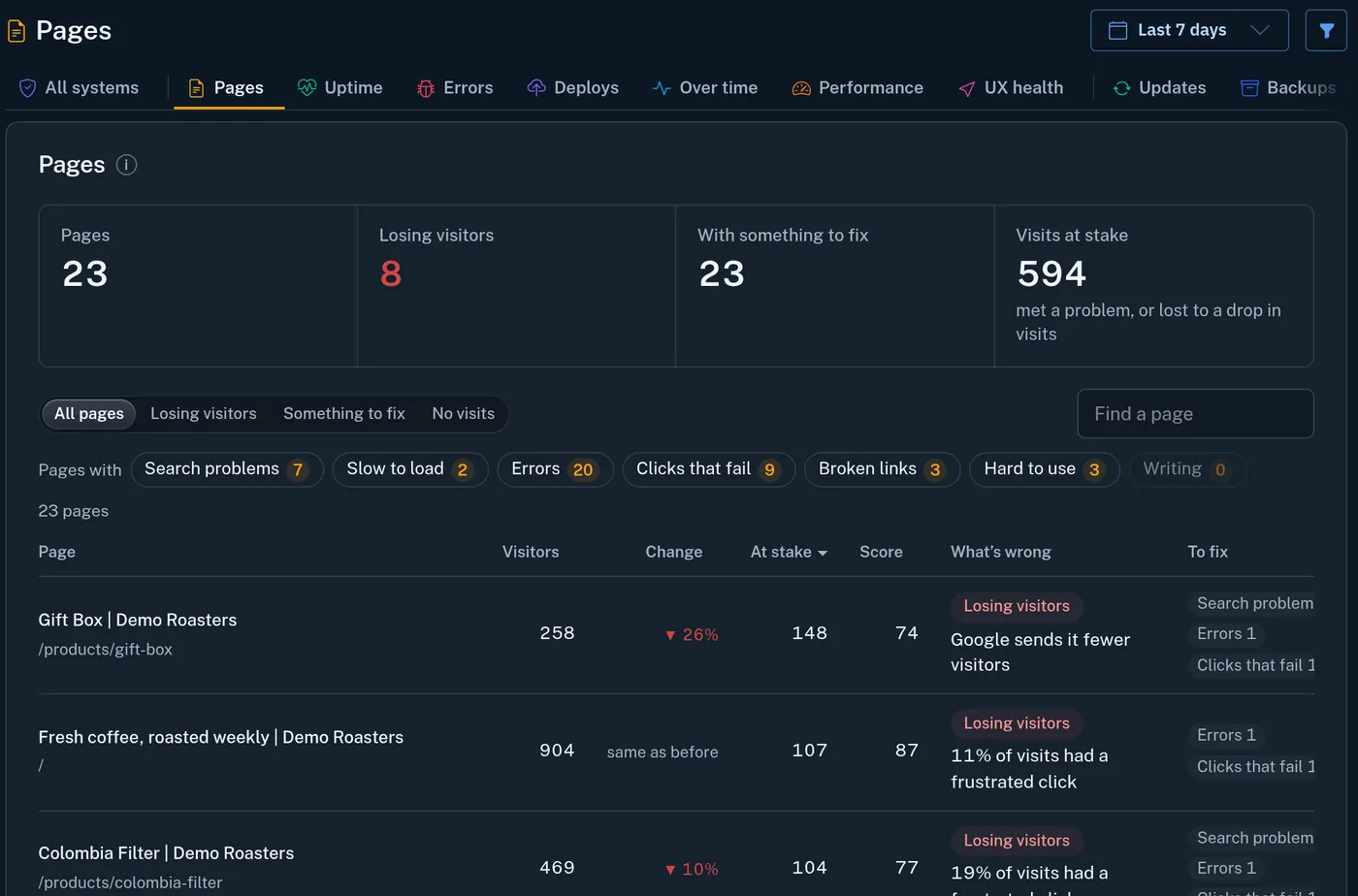
Find it
- Pages losing visitors Kept apart from the ones just worth fixing. A fall nothing explains is shown as exactly that, never given a reason.
- Visits at stake The visits that met a problem on the page, plus the visitors lost against the period before.
- A score for each page Out of 100, from its own findings. Accessibility is listed but left out of it, on purpose.
- Filter, search and sort By kind of problem, such as search, speed, errors, broken links or writing, or by biggest fall and most at stake.
See why
- The page record Click a page for its verdict, its traffic, speed, errors and Search Console figures, and every finding with where it came from.
- Shown on the page Findings that name an element are pinned on a saved copy of the page itself.
- Ask AI Ask in your own words what’s wrong with a page. It reads the same list.
Fix it, and know it’s fixed
- Assign it Give a finding to someone on the team. They’re notified and emailed with a link to the page.
- Mark it fixed The next check confirms it, or says it’s still there.
- Fine as it is Keep a finding you mean off the page’s list and its score. Put it back any time.
- Each fix links to its tool Every finding opens the report that shows it in full.
Questions people ask
Can I audit a site that isn’t mine?
Yes. Type any public website into the audit, a client’s, a prospect’s or a rival’s, and it runs the same checks. Google’s verdict needs Search Console, so it’s for your own site.
What does it cost?
The audit uses credits, by the page limit you pick, with the price on the button. Saved reports are free to open, and the robots.txt, sitemap, hreflang and AI checks come free with each audit. The weekly crawl, page basics, files, accessibility and content checks are on Basic and Pro. Health → Pages is on every plan.
Will it tell me my site is accessible?
No. It lists real barriers, each mapped to the WCAG 2.2 criterion it fails, with the elements it found. There is no score on purpose: the rules a machine can test are part of WCAG, not all of it, so a clean list isn’t a pass.
My site is built with JavaScript. Will the audit see it?
We check the home page first, for free. If it’s an empty shell, each page is opened with its scripts run before it’s checked, at a higher price per page, shown on the button. You can switch that on or off yourself.
How do I know a fix worked?
Mark the finding fixed on Health → Pages and the next check confirms it, or says it’s still there. Each new audit also lists what was fixed and what’s new since the one before.
Do you keep the text of my pages?
No. The content check keeps the numbers and the words it flagged, never your page text.
Put a goose on your site.
Run an audit and see what to fix first. See it all