
Forms and leads
Every enquiry in one place, and where it came from.
Build a form, a popup or a quote calculator without a developer. See every form on your site, the field people give up on and the sends that never reached you. Each enquiry lands in one inbox with the visits that brought the person, a score for how warm they are, and what they spent afterwards.
Form analytics, the form builder, the leads inbox and spam protection are on every plan.
- 14
- starting points for a new form
- 12
- field types to build with
- 0-100
- lead score from visits, pages and time
- 50,000
- leads in one CSV download
What you get
Anything without a plan label comes with every plan, including Free. The pictures are the real dashboard, from our demo shop with made-up visitors.
Every form, and where it loses people
See the exact question people give up on.
Forms lists every form on your site, built here or your own, with what came in and what’s unread. Open one to read what people sent, or to see how many saw it, started it and sent it, the field where the rest stopped, and the sends that failed on the way.
One list of forms
- Every form Where it is, how many were sent, the last one, what’s unread, and the share of starts that were sent.
- Open a form Its submissions, its analytics, and for a form built here, edit, pause or copy its code.
- Collect what they send A form backend for sites without one. Passwords, card numbers and files are never sent.
Where they stop
- Saw it, started it, sent it With the abandon rate, how long people take to start and to fill it in, and who came back to send it on a later visit.
- Sends that failed Starts refused for an invalid field, and sends that failed after the click: your server’s error, no answer, or your own error message.
- Field by field How many reached each field and stopped there, the error shown most, fields left empty, pasted into or gone back to.
- By source and device The abandon rate for each channel on each device, with the worst one picked out.
- Over time Starts and sends by day, as a chart or a table.
Then act
- Watch everyone who gave up The recordings of visits that left the form, or left it at one field.
- Count a send as a conversion One click makes the form a goal in your reports and funnels.
Forms and popups
A form that asks at the right moment.
Start from one of 14 forms and change it to fit. Show it in the page or as a popup, and only to the people it suits. If your site has nowhere to send forms, we keep the submissions for you.
Build it
- Form builder 14 starting points, 12 field types and up to 10 fields and steps, as a popup or in the page.
- The right moment After a delay, on scroll, on exit intent, after an event or from a floating button.
- Forms that fit the person Show, require or route a question by answer, amount, country or device.
- Call-back button A floating “Request a call”, one tap for a phone lead.
- Quote calculators From Pro planPrices, deposits and estimates worked out as people answer. 11 templates, and our server works the price out again so nobody can change it.
Change it
- Quick to edit Each field one row: drag it into order, add one between any two, duplicate it, and undo a move.
- Click to open Click a question in the preview to open it.
- Describe what you charge From Pro planType your pricing in a sentence and get a working calculator to start from, paid from your credits.
The leads inbox
Enquiries stop living in your email.
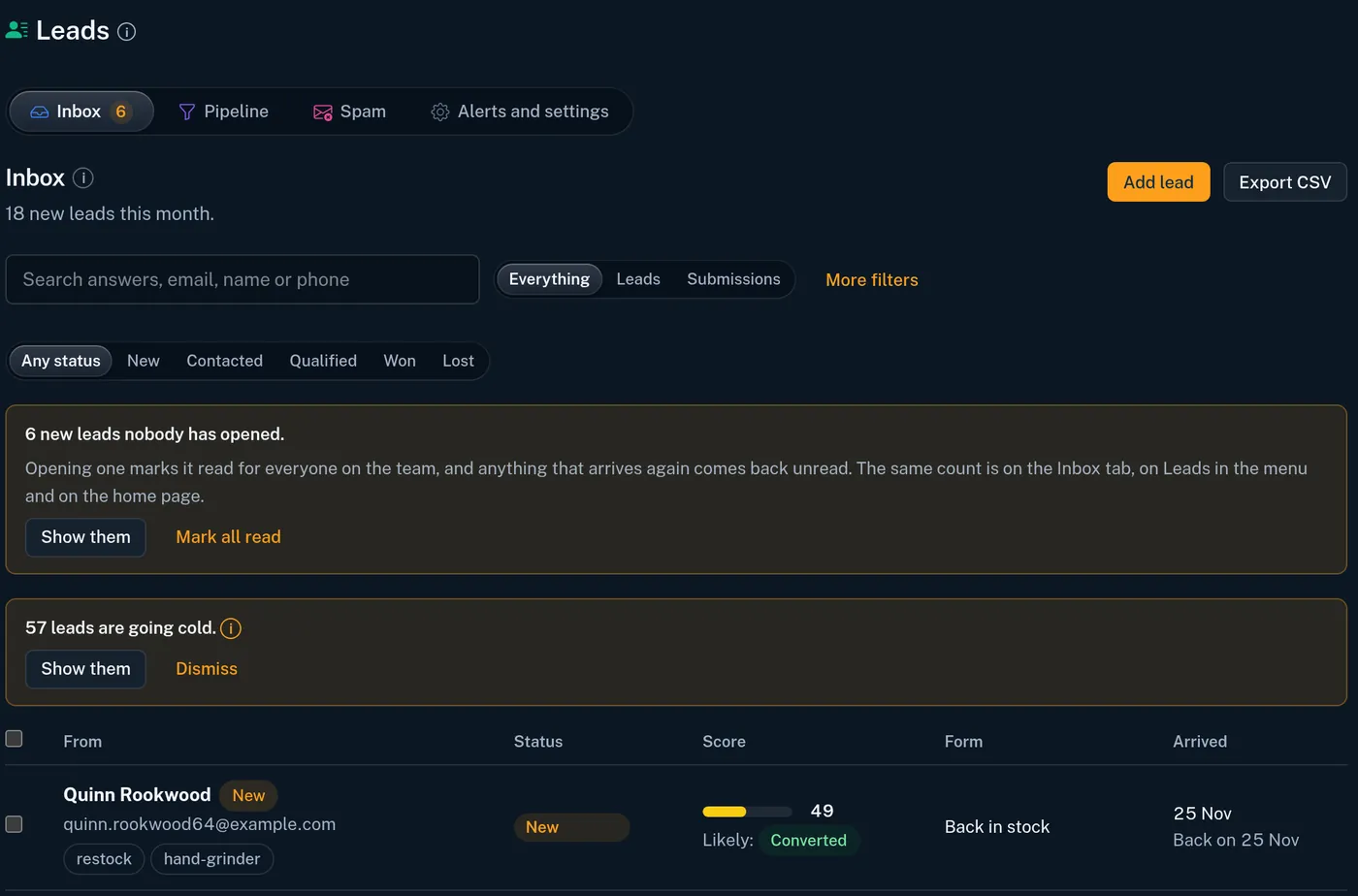
Everything your forms bring in sits in one inbox, and it never blurs a person with a message: a lead left an email or phone number, so there’s somebody to reply to. Open one and see what they sent, the visits that brought them, and what they did and bought after.
The inbox
- Leads and submissions apart Only leads get a status and a score. A form that asks for no contact details is a submission: read it and you’re done.
- Unread for the whole team Opening one marks it read for everyone, so two people don’t answer the same enquiry.
- Find anyone Search answers, names, emails and phones, and filter by form, tag, status or leads going cold.
- Move it on from the list Change a status in the row, or tick many and move them to spam or delete them.
- Leads from elsewhere Add a contact from a phone call or your shop, so everyone’s in one place.
Each lead
- What they sent Every answer in the form’s order, their own words first.
- Where they came from The campaign, the landing page and each visit we linked, step by step, with the recording of the visit.
- Who to call first A 0-100 score from their visits, pages and time on the site, and their chance of converting.
- What they spent Orders from their own visits, so an order placed a week later still counts.
- Notes, tags and history Every status change signed with who made it.
Spam that loses nobody
- No puzzles A small proof of work in the browser, a trap field bots fill in, and how fast the form was sent. On for every new site.
- A spam folder From Basic planCaught submissions kept 30 days with the reason, and put back with “Not spam”.
- Watch the visit From Basic planSee the visit that sent a catch before you decide.
Follow-up and pipeline
Nobody waits too long, and you see which forms bring the sales.
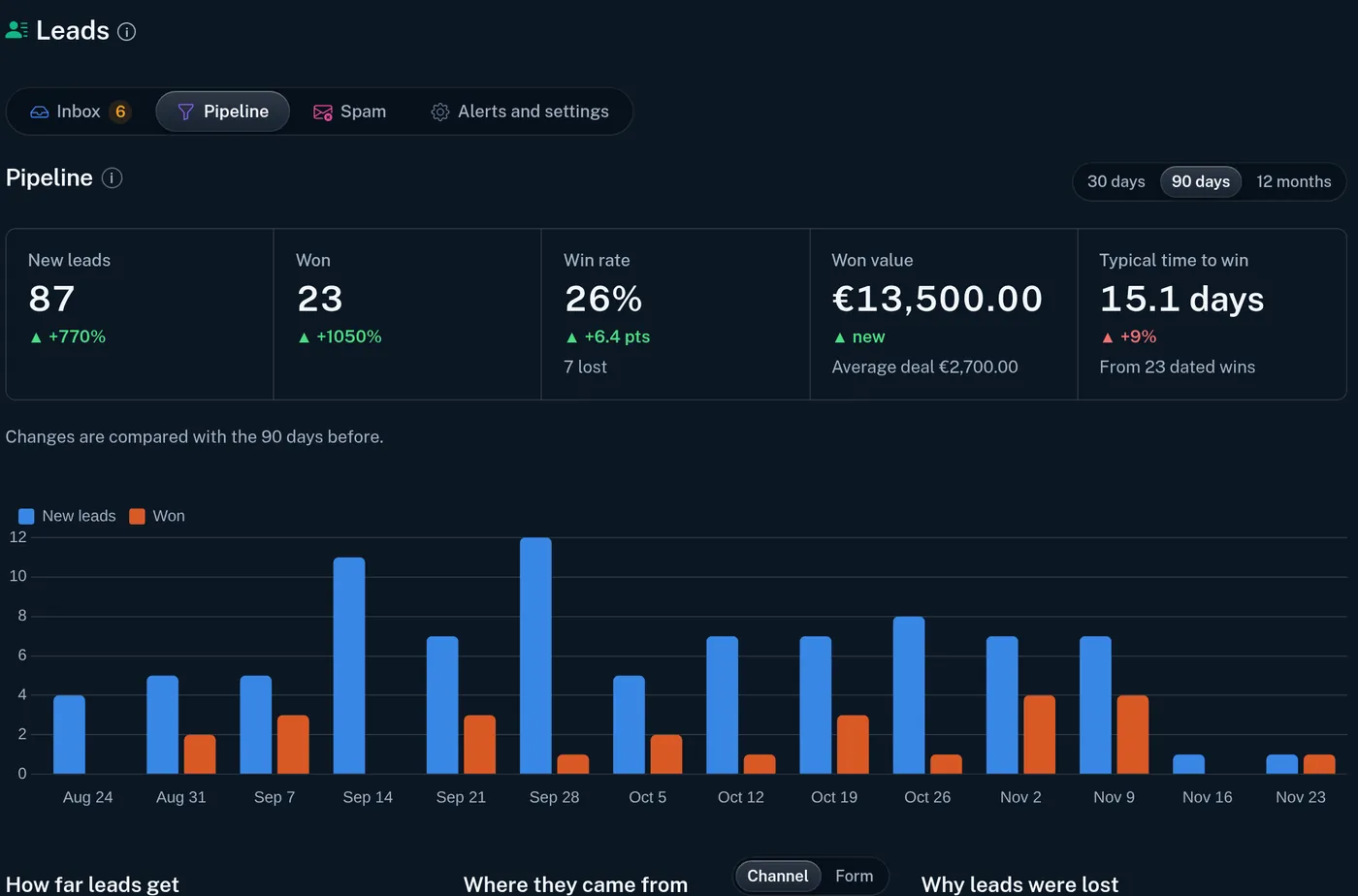
Hear about each lead as it arrives, or once a day, and get told when one is going cold. On Pro, move each lead from New to Won and see how far your leads get, which sources bring the ones you win, and why the others were lost.
Reply while they’re warm
- Lead alerts Each new lead or a daily summary, sent to the right person by their answers, with webhooks for Slack, Zapier and Make.
- Going cold Leads with no status change, note or new sign-up for the days you set are flagged, with a daily email.
- Your list is yours Download up to 50,000 leads as a CSV, one row each, with their consent and its date.
The pipeline From Pro plan
- New to Won New, Contacted, Qualified, Won and Lost, with notes and the deal’s value.
- How far leads get How many reach each step, your win rate and the typical time to win.
- Where the wins came from Leads, win rate, won value and what they spent after, by the channel of their first visit or by form.
- Why leads were lost Pick a reason when you mark one Lost, and see the top reasons on the card.
More on your site
Talk to visitors while they’re on your site.
Tell people what’s on, ask what they think, let them tell you when something’s broken, and ask your happiest customers for a few words. Each one can show only to the visitors it’s meant for.
Tell
- Announcements Bars, popups and “What’s new”, with coupons and countdowns.
- Discount popup Shows a code after someone signs up, then credits the orders it brought. One code for everyone.
- Share buttons 9 buttons with tagged links, so the visits they bring come back named, not “direct”.
- Audiences Show any of these by country, source, device, pages seen, time and more.
Ask
- Surveys NPS and 5 more question types, with skip logic and sampling.
- Was this helpful? From Basic planA one-tap vote at the end of a page.
- Feedback button Visitors point at what’s broken, and it arrives with their errors and a masked snapshot of the page.
Testimonials
- Ask at the right moment After a purchase or sign-up, after a 9 or 10 in a survey, or from a link or QR code you send.
- Their permission, kept They tick a box that lets you show their words and name, and the sentence they ticked is kept with each one.
- Nothing shown until you approve it New ones wait under Approve. Reject the ones you don’t want, fix a typo (what they sent is kept), pin the best to the top, or type in ones you already have.
- Show them your way One line in your page for our block, as a wall, a list or one at a time in your page’s own font and colours. Or Copy HTML on any approved one, or read them from your own code or the API.
- Hear about new ones Each new one can go to Slack or a webhook. Text only.
Questions people ask
Does it work with forms I didn’t build here?
Yes. Every form on your site is listed and counted: views, starts, sends, the abandon rate, the field where people stop and the sends that failed.
How do I find out why people give up on a form?
Open the form. It shows the field where most people stopped, the error message shown most, fields left empty, and the abandon rate by source and device. Then watch the recordings of the visits that gave up.
My site has nowhere to send a form. Can I still use one?
Yes. We keep the submissions for you and put them in your leads inbox. Passwords, card numbers and files are never sent.
Will my customers have to solve a puzzle?
No. Spam is caught with a small proof of work in the browser, a hidden trap field and the time the form took. On Basic and Pro, anything caught waits in a spam folder for 30 days, so a mistake loses nobody.
How many enquiries can I get on Free?
Free opens 200 new leads and 200 submissions a month. Anything past that is still kept, and opens when you add Unlimited leads for $3 a month or move to Basic. Nothing a visitor sends is refused.
Can a visitor change the price a calculator shows?
No. Our server works the price out again from their answers, so what reaches you is the real figure. Calculators are on Pro.
Put a goose on your site.
Build a form today and see where every enquiry came from. See it all