
For developers
Your site’s numbers, in the tools you already code in.
Add the tag or a server package, then take it from there: ask Claude or Cursor about your site, read every report as JSON, add release notes and leads from your own code, and get signed webhooks your server can check. Every deploy is marked, so the error or the slow page points at the release behind it.
The API, AI apps, webhooks and deploys are on every plan, Free included.
- 114
- read API endpoints, with a key per site
- 27
- kinds of alert, each with its own webhook tick
- About a day
- of retries when your end is down
- 7
- server packages, plus the WordPress plugin
What you get
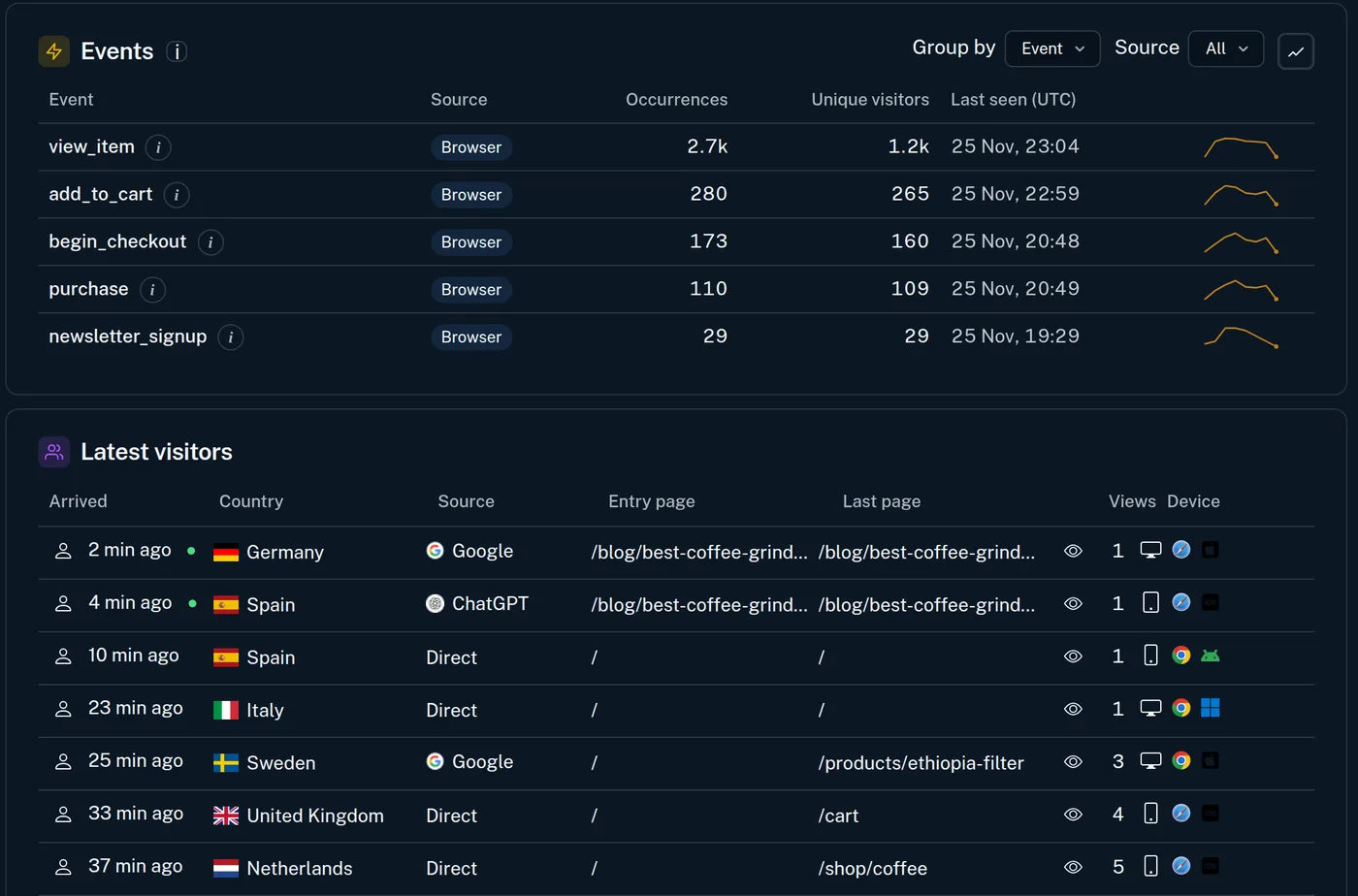
Anything without a plan label comes with every plan, including Free. The pictures are the real dashboard, from our demo shop with made-up visitors.
Set it up
A tag in the page, a package in the app.
The tag gives you visits, events, errors and speed from the browser. A server package adds what only your app sees: server errors, every route, query and job, and the firewall. Both tell you the moment they’re working.
In the browser
- One script It loads after your page has finished loading, and the extra parts load only when a feature is on.
- Pinned versions Each release has a hash and never changes. On pinned code the browser checks every file of the script against it and refuses one that was changed.
- Custom events Track anything with up to 20 properties, from the browser or your server. Email addresses are dropped.
- Who’s signed in identify sends a user’s details, such as plan or company size, from the browser or any server package.
- 31 install guides Next.js, Nuxt, SvelteKit, Astro, plain HTML and the rest, one step at a time. The last step ticks itself when your first visit arrives.
On the server Needs an install
- Seven languages Node, Python, PHP, Ruby, Java, .NET and Go, plus the WordPress plugin. No dependencies.
- Your framework Express, Fastify, Koa, Hono, Next.js and NestJS; Django, Flask, FastAPI, Celery, Dramatiq and RQ; Laravel and Symfony; Rails, Sinatra, Rack and Sidekiq; Spring Boot and any servlet container; ASP.NET Core; net/http, gin, echo and chi.
- Events your server knows Purchases, refunds, leads, signed-in users and custom events, sent from your own code, so an ad blocker or a closed tab loses nothing.
- Through your own domain The packages send the tracker’s data through your site’s own address by themselves, so fewer visitors are lost.
- Maintenance mode Switch on a “back soon” page from the dashboard while you work.
- Any Linux or Windows server From Basic planThe server agent adds the firewall and flood protection whatever your app is written in.
Your AI assistant
Ask about your site from the chat beside your code.
Claude, Claude Code, Cursor, VS Code and other MCP apps read your numbers, errors, uptime, server speed and search. Paste one address or run one command, sign in, and pick the sites it may read.
Connect it
- A step for each app Site settings → AI apps has a button for Cursor, a command for Claude Code and VS Code, and the address for the rest.
- Sign in, no key to copy The app sends you to SiteGoose to sign in as usual, then asks which of your sites it may read.
- It sees what you see Each site as you do there, with your role. Signed in, it can also read the site’s security check.
- Cut it off any time Profile → Connected apps disconnects it, and so does changing your password.
- A key for the rest An app that can’t sign in can use the site’s read key instead.
What you can ask
- Visitors and conversions Traffic, sources, pages, funnels and goals, with the dashboard’s filters.
- What’s broken Open errors, uptime and outages, and server speed.
- Search Your rankings, Search Console, keyword research, backlinks, AI answers and the site audit, read for free.
- Checks that cost credits Paid per useOff until an owner allows it, up to a monthly cap. The app says the price and asks before it checks a ranking or runs an audit.
- Or hand it a problem Report for AI copies a problem as a Markdown fix list for your coding assistant.
The REST API
Read every report as JSON. Send in what your tools know.
The read key gets the numbers the dashboard shows, with the same filters. A separate write key lets a deploy script, a CI job, Zapier, Make or n8n put notes, goals and leads in. And every number can be taken out whole.
Reading
- 114 endpoints Visitors, pages, sources, conversions, errors, speed and the rest. Send the key as a Bearer header; a key is for one site, so no site id.
- Every call written out What each one takes and returns, with curl and JavaScript ready to copy, and the same list in Site settings → API.
- Docs your tools can read The whole API as /openapi.json for code generators and /llms.txt for AI coding tools, read from the code so it can’t go stale.
- Totals only A read key can’t open one visit or narrow a report to one person, so a leaked key gives away no one’s visits.
- On Free too 1,000 calls a month, 6 a minute. Basic and Pro get more.
Writing
- A write key at /v1 A `wk_` key made in Site settings → API, apart from the read key. It can’t read anything.
- Chart notes Mark a release or a campaign on the chart from your deploy script. List and remove them too.
- Goals Add and remove goals from your own code.
- Leads From Basic planSend a lead from a phone call or another form straight into the leads inbox.
- Marked “API” Whatever the API added says so, and each key is shown once: we keep only its last four characters.
Taking it all
- CSV export 32 report sections, up to 100,000 rows each.
- Download all your data Every day the site has kept, as a ZIP of CSV files in Plausible’s own export format.
- Download raw events From Basic planEvery hit, one row each, with its page, source, campaign, location, device and properties, a CSV for each month, for your own warehouse. For the site’s owner.
Webhooks
Alerts your server can trust, and a log of every one.
Each automatic alert can go by email, by webhook, or both. Every post is signed, tried again for about a day if your end is down, and listed with what your server answered, so you can see one that went missing and send it again.
What gets posted
- 27 kinds of alert Site down and back up, new errors, unusual traffic, a dead form, certificate and domain expiry and more, each with its own email and webhook tick.
- Where it’s from Each alert says which part sent it, such as Security or Health: Uptime, so one channel can route them.
- New leads Each lead as it arrives, or a daily summary, to its own addresses.
- Your own rules From Basic planA metric you watch crossing your line, to the rule’s own address.
- Several addresses each Side by side, each with its own Send test.
- Slack and Discord Paste the channel’s webhook link as Slack or Discord gives it, and it posts as it is.
Checking it’s us
- Standard Webhooks signatures Check them with the standardwebhooks library in any language, or by hand from the snippet on the page.
- One secret per site Reveal, copy or rotate it. A rotated secret keeps signing beside the new one for a while, so no receiver is cut off.
- The same id on every try Retries and resends keep their id, so your end can drop repeats.
When your end is down
- Tried again for about a day A timeout or an error answer is tried again, waiting longer each time. A deleted Slack hook isn’t asked again.
- Delivery log Every post, what your server answered, its body, and a Resend button.
- “Back up” cancels “down” If the site is back before a “down” got through, the old one isn’t delivered hours late.
- Zapier, Make and n8n Step-by-step recipes: a new lead into Google Sheets, “site down” into a phone alert, a new error into a GitHub issue, a release note from GitHub Actions.
When you ship
Every release marked, and the trouble that followed it.
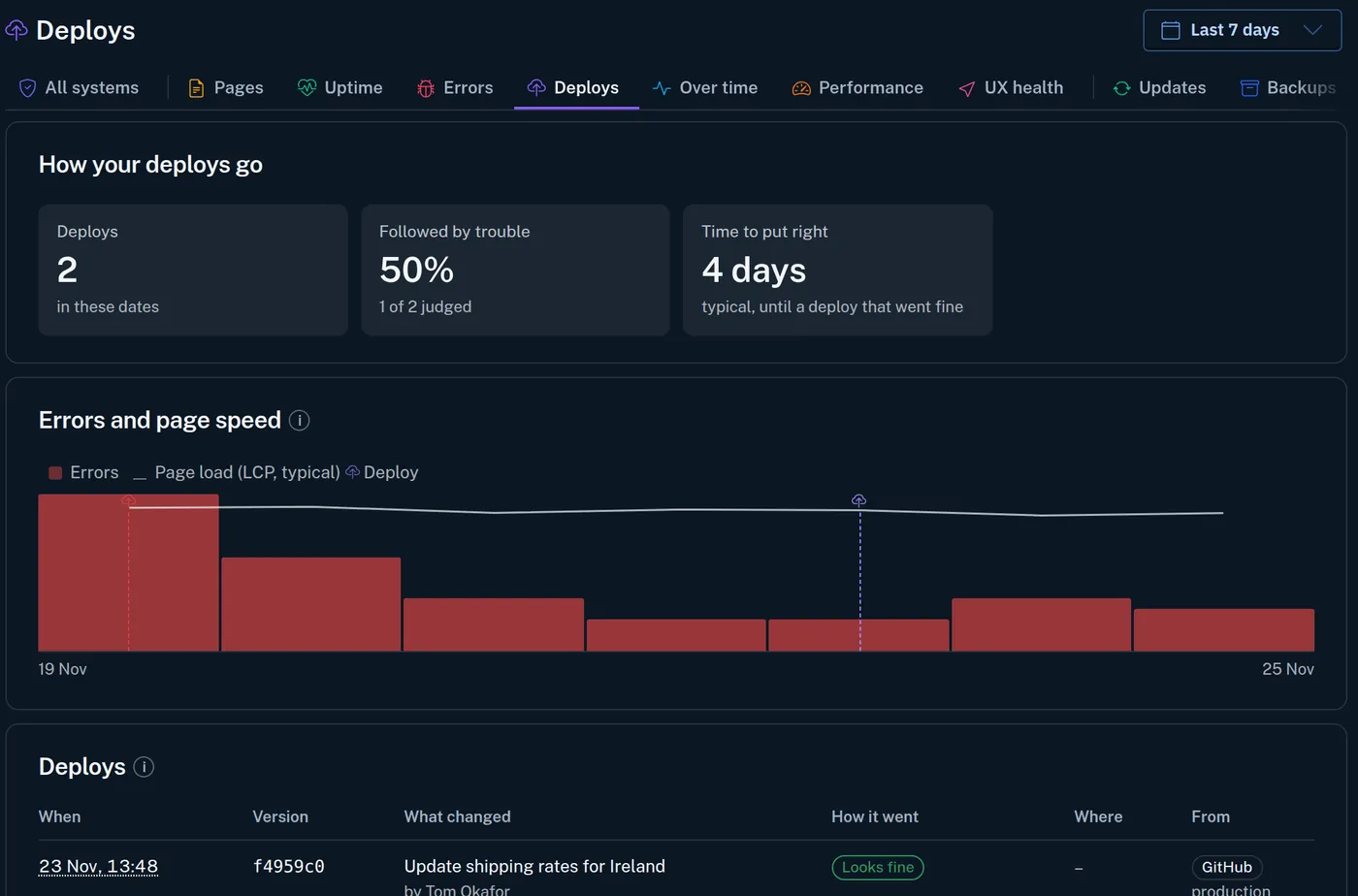
Tell us how you ship and every version you put live is recorded, wherever it came from. The chart, the errors and the speed report all mark it, so “what did we change?” has an answer. Your cron jobs and backups check in the same way.
How we hear about a release
- GitHub and GitLab A webhook on the repository: deployments, releases or pushes, whichever means “live” for you.
- Vercel and Netlify Their deploy notifications, production only. Previews never count.
- Your pipeline One curl at the end of GitHub Actions, GitLab CI, Jenkins or anything else, with a deploy key that can only add a marker.
- Your server From Basic planThe agent sees a git pull, a new Docker image or copied files, and says when an app hasn’t pulled what you pushed.
- Nothing set up A new build seen in visitors’ speed data counts as a deploy too.
- Several repositories A front end, an API and a worker stay apart, each named on its own deploys.
What each release shows
- How it went Errors and page speed before and after, the commits it put live, and how often a release goes wrong.
- On the chart A note at the hour it went live, beside your own notes.
- A release that went badly A note in your feed and inbox when one is followed by trouble, by email or webhook if you turn it on.
Fix what it broke
- Your own code in the stack Source maps turn minified stacks back into your code, and name the release that brought the error in.
- Create issue Opens a filled-in GitHub or GitLab issue in your browser, signed in as you. We hold no token of yours.
- Copy for your AI assistant The error with its stack and the steps before it, as Markdown.
- Cron jobs and backups One line at the end of a job calls its own address. You hear when a run is late or says it failed, from cron, systemd, GitHub Actions, Laravel’s scheduler or anything else.
Questions people ask
Which AI apps can connect?
Claude, Claude Code, Cursor, VS Code, OpenCode and other apps that speak MCP. Site settings → AI apps has the step for each: sign in, and pick the sites it may read. Apps that can’t sign in can use the site’s read key.
Can the API or an AI app see single visitors?
Not with a key. A read key gets totals and breakdowns only, can’t open one visit and can’t narrow a report to one person.
How do I know a webhook came from you?
Every webhook is signed the Standard Webhooks way, with one secret per site, so your server can check it with their library in any language. If your end is down we try again for about a day, and the delivery log shows each attempt with a Resend button.
How do you know when I deploy?
From whichever you have: a GitHub or GitLab webhook, Vercel’s or Netlify’s deploy notification, one curl from your pipeline, or the server agent seeing a git pull or a new image. With none of them, a new build in visitors’ speed data still counts.
Is there a Zapier app?
No. Zapier, Make and n8n work through our webhooks and the API, and the recipes show each step.
Does it cost extra?
No. The API, AI apps, webhooks and deploys are on every plan. Free gets 1,000 API calls a month. Searches an AI app runs for you use credits, and only once an owner allows it.
Put a goose on your site.
Connect your AI app, point your webhooks at your own code, and mark your next release. See it all