
Find the searches worth writing for, then write the page.
Type a topic or any website. Get the phrases people search for, how many search each month and how hard each one is to rank for. Keep the good ones in lists, then write the page against Google’s top 10 with a score that rises as you go.
Try it free: 100 search credits for your first 30 days. After that, credit packs (2,500 credits for $5), or the SEO add-on on Basic and Pro.
- 13.5 credits
- a report (about $0.027)
- 50
- phrases a report
- Any
- website, yours or a rival’s
What you get
The numbers in the pictures are made up. The features are real.
Keyword ideas
Know what to write next.
Start from a topic and get the phrases around it. Start from a website, yours or a rival’s, and see the searches it shows up for. Or pick a competitor and see the phrases they rank for and you don’t.
- waterproof trail shoesDifficulty 34 of 1002,900 a month
- trail shoes for wide feetDifficulty 12 of 100880 a month
- best trail shoes for mudDifficulty 27 of 100720 a month
- trail shoes vs hiking bootsDifficulty 19 of 100590 a month
A report Paid per use
- From a topic Type “trail shoes”, get up to 50 phrases people actually search for.
- From a website The searches any site appears for, most searched first, with its position, the page that ranks and its estimated visits.
- A competitor’s gap Up to 50 phrases a competitor ranks for and you don’t.
- Searches a month How many people type each phrase, with a small line of its last 12 months and its quietest and busiest month.
- Difficulty How hard each one is to rank for, on a 0 to 100 scale.
- Check on Google Today’s real position for any phrase in the report, in a click.
- Saved for you Every report is kept, and opening it again within seven days is free.
Trends
When people want it, and where.
Put up to five phrases on one chart of Google Trends: interest week by week over five years, on Google’s own 0 to 100 scale. Below it, the countries searching for them most, and the regions inside any one.
A trends report Paid per use
- Five years, week by week One line a phrase, so you write the Christmas page in October, not December.
- This year against last Each phrase’s average, and the past 52 weeks against the 52 before.
- Where it’s searched The countries most interested, and one click from a country to its regions.
- Opened from any phrase From Keyword ideas, or from the small line beside any phrase’s monthly searches.
Keyword lists
Keep the good ideas, pay to track only the ones that matter.
Tick phrases in a report or in Search Console and save them to a named list, with the figures they had. When you’re ready, track any of them on Google, with the cost shown first.
Lists
- Free to keep Up to 20 lists a site and 500 phrases in each, saved without tracking them.
- From anywhere From a Keyword ideas report, from Search Console’s searches, or typed in by hand.
- Download Any list as a CSV.
- Track when ready Up to 20 phrases at once go to the rank tracker, and you see the cost before anything is checked.
Content editor
Write the page Google is looking for.
Type the search and pick the page, yours or a new one. We read Google’s top 10 results and list what most of them have. You write with a score out of 100 and a checklist that ticks as you go, then copy the text or the HTML into your site.
The brief
- Words they use The terms the top pages share, how often they usually use them, and a warning when you overdo one.
- Questions people ask The questions on Google for this search, and the ones the top pages answer under a heading.
- Sections and length The topics they cover and how long they run.
- A score that moves How much of what the top results share your page covers, rising as you write. It isn’t a promise of a ranking.
- Saved drafts Come back to any draft, and look at the top pages again when the results are over 30 days old.
Help writing it From Basic plan
- Write a missing section Paid per useA first draft of one item on the checklist, for you to check and paste in.
- Answer a question Paid per useA short answer to a question people ask on Google.
- Work the words in Paid per useSelect a paragraph and get it back with the missing terms worked in.
- Title and description Paid per useA suggested title and the text under it on Google.
For a search you already track
- What am I missing? The topics and questions the pages above you cover and yours doesn’t, read as soon as you open the search.
- Draft the fix From Basic planA new title, description, sections and answers for those gaps only, with [brackets] for what only you know. You check it before using any of it.
Search Console and Bing
The searches you already show up for.
Connect Google Search Console for free and see the searches that already find you, joined to your own visits and sales. The ones almost on page one are your cheapest new content.
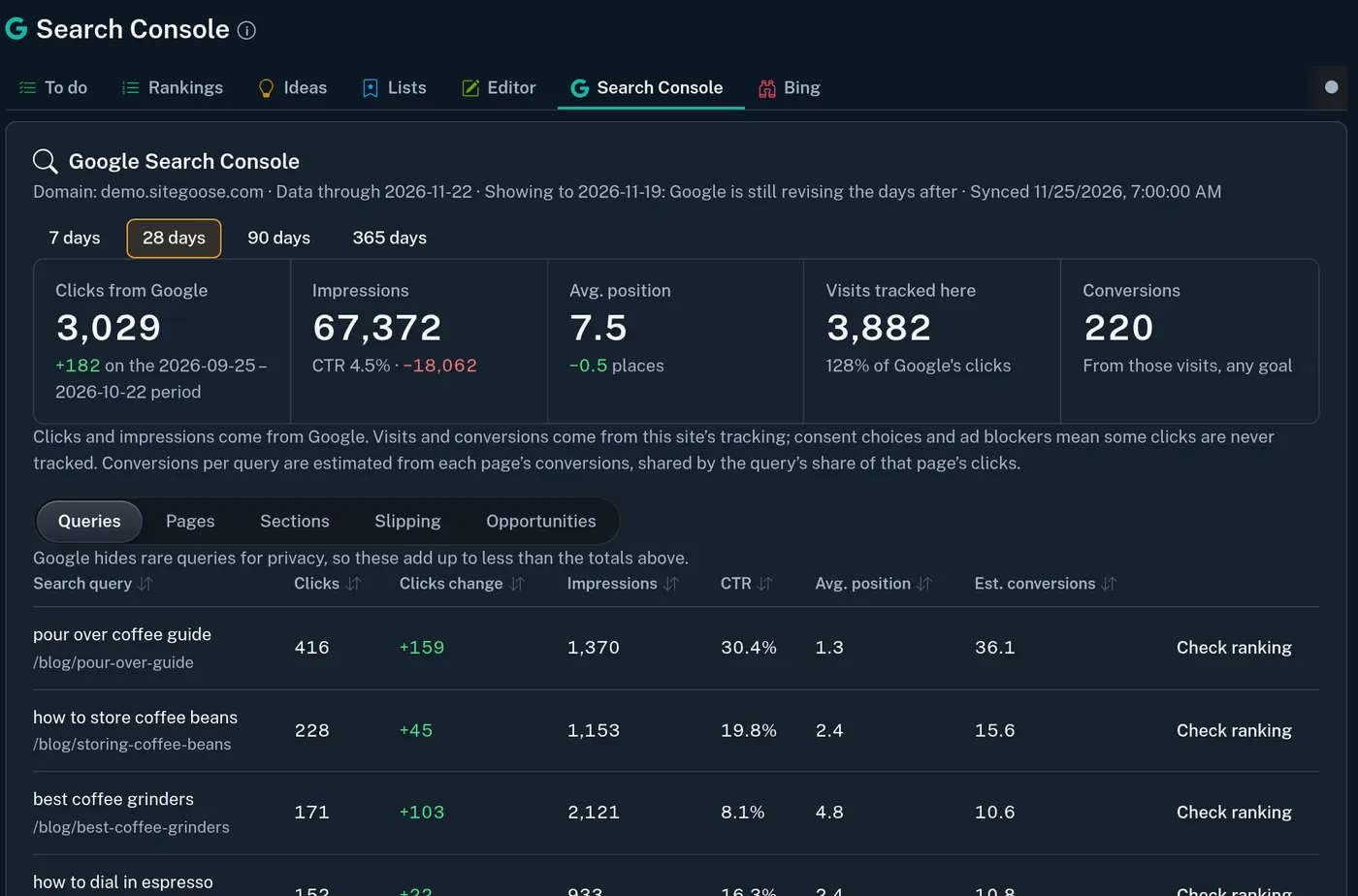
Google Search Console
- 16 months of history Real clicks, times shown and positions, by search, by page and by section of the site (all of /blog together).
- Joined to your visits Each search and page with the visits it brought and the sales or sign-ups that followed.
- Pages that went backwards Pages that lost clicks, and pages holding their clicks while sliding down the results, which are the ones still worth catching.
- Almost on page one Searches just off the first page, with about how many more clicks a month each is worth, biggest first.
- Ranking well, clicked rarely Searches you show up high for that people skip, so a better title and description is the fix.
- Check ranking Any search in the report checked on Google in a click, or saved to a keyword list.
Bing Webmaster Tools
- Bing’s own figures Sign in to Bing once: its clicks, searches and positions for your pages, week by week, beside your visits from Bing.
- Send pages to Bing Paste a new or changed address and Bing is asked to crawl it now, up to the day’s allowance Bing sets.
Put a goose on your site.
SEO is one part of it. You also get analytics, page speed, security checks, a firewall, error logging and more. See it all