
Website security
An A to F grade your whole team can understand.
We look for the holes attackers look for, grade your site, and say how to fix each one, starting with what lifts the grade most. Then we keep watching your pages, your scripts, your files and your logins, and tell you when something changes that you didn’t change.
Free checks one site by hand once a month. Basic and Pro run it any time, every week or every month, with alerts.
- 22
- paths attackers try first, such as .env and .git
- Every hour
- 10 of your pages reloaded and compared
- 50,000
- server files checked every hour
- 21
- attack patterns, each off, monitor or block
What you get
Anything without a plan label comes with every plan, including Free. The pictures are the real dashboard, from our demo shop with made-up visitors.
The security check
One letter, and the shortest way to a better one.
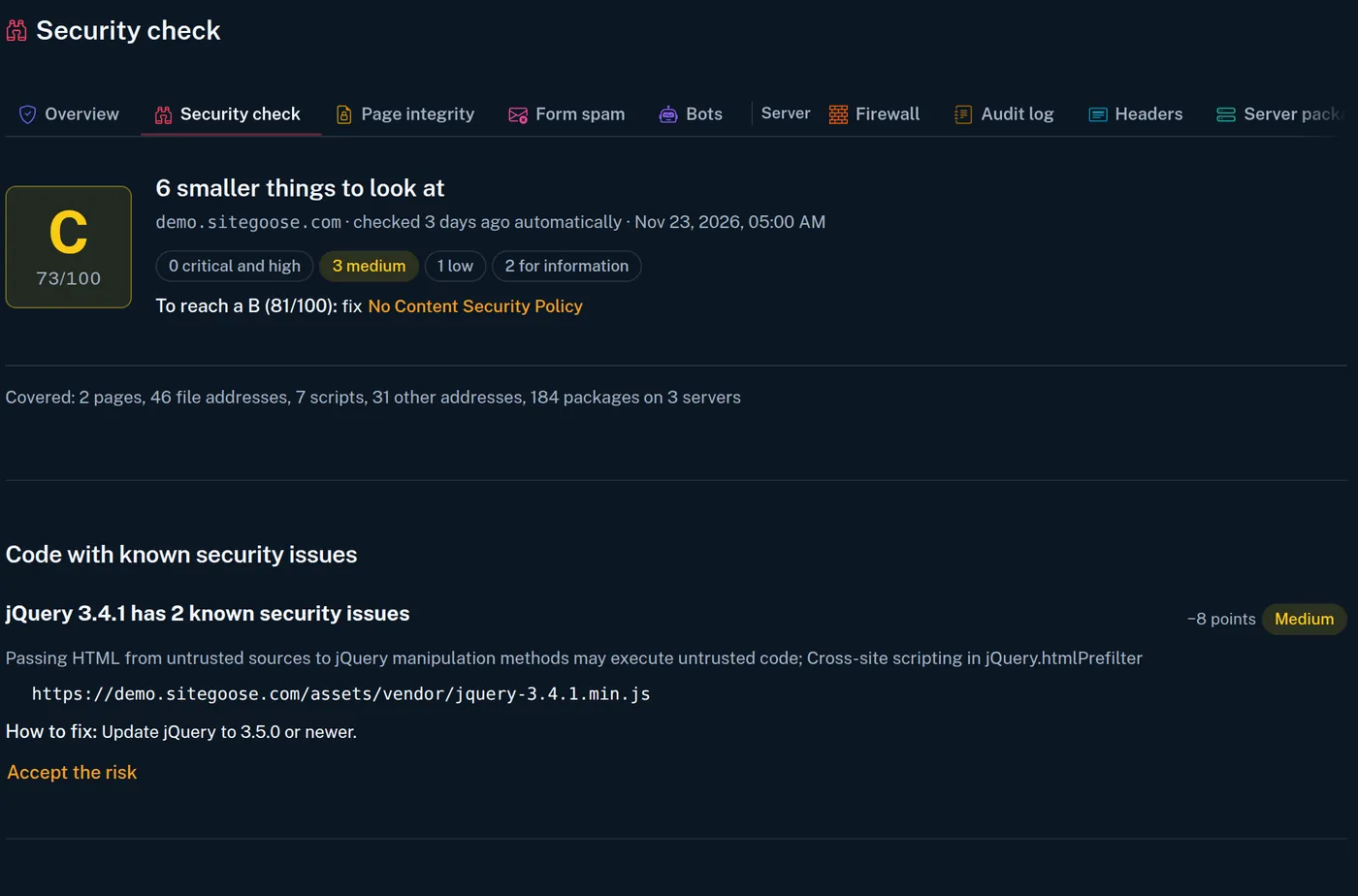
The check asks your site the questions an attacker’s scanner would, and grades the answers A to F. Above the findings it says which ones to fix for the next grade up. Each finding says what was found, where, and how to fix it. Fix it, check again, and it moves to “Fixed since the last check”.
Read the grade
- A to F, out of 100 One letter for the whole site, and a count of critical and high, medium and low findings.
- The way to a better grade “To reach a B: fix these two.” Click one and the page jumps to it. Each finding says how many points it costs.
- What it covered How many pages, file addresses and scripts it read, and, with a server package, which parts of your server were checked and which nobody looked at yet.
- Warnings from Google Whether Google lists your site for malware or deceptive pages, which puts a red warning in front of it. Looked up every day.
- Only for your own site You show us the domain is yours first, with the tracking tag already on your home page, a meta tag or a DNS record. Nobody can aim checks at someone else’s site.
What it looks at From Basic plan
- Files that shouldn’t be public 22 paths such as .env, .git, backups and database dumps, judged by what’s in them, so a decoy doesn’t count.
- Developer leftovers Secret keys in the code browsers download, open GraphQL, loose CORS, stack traces and debug pages.
- Vulnerable code The scripts on your pages, and up to 500 your real visitors loaded, matched against known holes.
- HTTPS and headers Certificate, redirects, mixed content, 6 security headers, cookie flags and the versions your server gives away.
- Domain and email SPF, DMARC, CAA, DNSSEC and subdomain takeover, the ways someone pretends to be you.
- Your packages and your server Needs an installnpm, PyPI, Packagist and more with the command that fixes each hole, and your server’s admins, SSH keys, jobs and settings.
Work through it
- How to fix Every finding has the fix in plain words, the evidence it found and links to read more.
- Fix it in one click Needs an installA missing header is turned on from the finding itself when our server package is on your site. Check again a minute later to confirm.
- Copy it for whoever fixes it One finding, or all of them, as plain text for a ticket, a chat or an email to your developer.
- Accept a risk From Basic planLeave a finding out of the grade and the alerts with a written reason. The team sees who accepted it and why, and anyone can reopen it.
Run it again From Basic plan
- New and fixed Each run marks what’s new since the last one and lists what you fixed.
- Every week or every month The same check run for you, with an email of only what changed.
- Earlier checks Your last 12 grades and counts in a table, so you can show the trend.
- A report to hand over A PDF, or a read-only link that expires when you choose, for a client, an auditor or an insurer. The link leaves out exposed file addresses and your team’s names.
What it watches
Hear when something changes that you didn’t change.
A new script on your checkout, a page whose text was replaced, a file on your server that’s different today. These are how break-ins show themselves. Each change waits on the page until someone says it was theirs, so a deploy is accepted in one click and a hack stays in front of you.
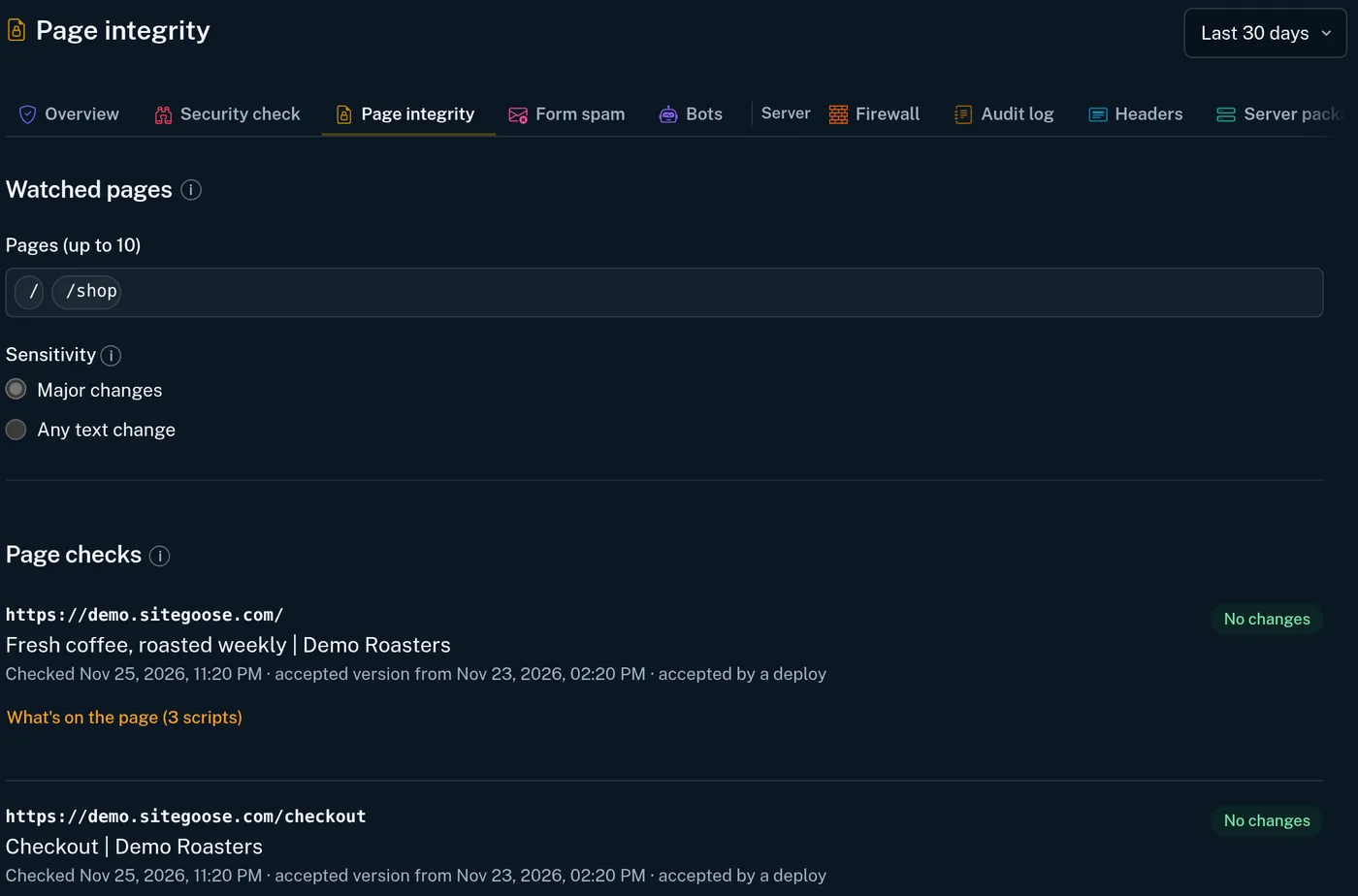
Your pages From Basic plan
- Watched pages Up to 10 pages loaded every hour and compared with the version you accepted: new scripts, replaced text, a new title, redirects away and 14 hacker and spam words.
- Accept or look into it After a deploy, accept the changes. Not yours? The page says what to check first.
- Payment page scripts Every outside script on your checkout, authorised with a written reason or marked not authorised, with when it was first and last seen. Evidence for PCI DSS 6.4.3 and 11.6.1.
- A new script on checkout Alerted within 15 minutes, and listed until someone decides.
Your server’s files From Basic plan
- Changed files Needs an install50,000 files checked every hour, and WordPress core against the official copies. Only paths and hashes leave your server.
- Signs of a hack Needs an installWeb shells, PHP in an uploads folder, hidden code run with eval: listed apart from your own changes.
- Accept after a deploy Needs an installOn the page, or from your deploy pipeline with one command, so your own releases don’t alert.
- Stopped reporting Needs an installSaid on the page when the server hasn’t checked in for 3 hours.
Everything at a glance
- The Overview tab Suspicious visits, bots turned away, spam stopped and failed logins, with one line for where every other tab stands.
- Page changes in real browsers A new script host, including one a tag manager added, or a form another script rewrote to send somewhere else. Mark it expected and it’s quiet for good.
- Certificate and domain Looked up every day, with a warning 30, 14, 7 and 1 days before either runs out.
- Visitors stay on your site A split test or a form can only send visitors to your own domain, so a stolen login can’t turn your site into a phishing link.
Firewall
See what it would stop, then let it block.
A firewall that runs inside your own app, on any stack, with no change to where your traffic goes. It starts as a trial run: the Activity view shows every request it would have blocked, why, and the pages they went for. When you’re happy, switch it to block.
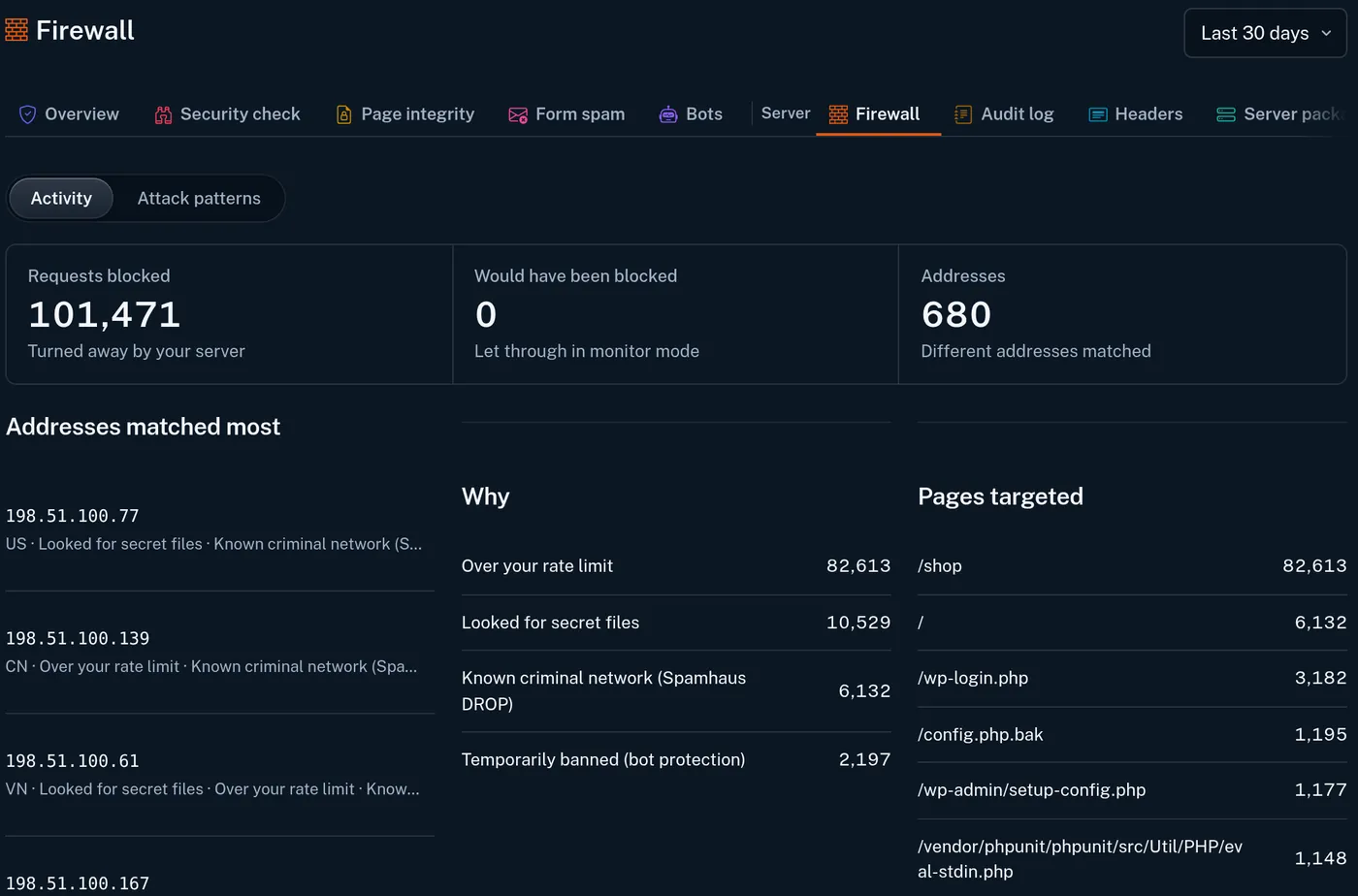
What it caught Needs an install
- Activity Requests blocked, the addresses behind them, why each was stopped and the pages they targeted, for any dates.
- Would have been blocked In the trial run, the same list of what it would have stopped, so you know before it blocks a real visitor.
- Banned right now Every address on a temporary ban, until when and why, with Unban.
What it can stop Needs an install
- Allow and deny lists One address or range a line. Your office and your servers on the allow list are never stopped.
- Known criminal networks Spamhaus’s lists, blocked with one switch.
- Attack patterns 21 rules for the usual probes. A rule a real visitor might trip starts on watch, and each has “What to do” beside it.
- Automatic bans Floods, password guessing, visits that score as bots and addresses looking for .env or .git, banned for a while without you.
Headers, and where it runs
- Security headers Needs an installSwitch on HTTPS only, clickjacking and sniffing protection and the rest, with what each one costs you said beside it.
- Content policy, tested first Needs an installRun a policy in report-only mode and see what it would block in visitors’ browsers before you enforce it.
- Node, Python, PHP, Ruby, Java, .NET and Go Needs an installOur package inside your own app, or the WordPress plugin, or the agent on any Linux server.
- Cloudflare Your lists and rules sent to your Cloudflare zone every 10 minutes, so they block at the edge with nothing to install.
- Switched from the dashboard Needs an installTurn the firewall, the audit log or the file checks off and on from Server package, with no deploy.
Logins and changes
Who got in, and what they changed.
A login from a country an admin has never used, a new admin, a new SSH key, a plugin installed at 3am. Each is listed with who, when and from where, and the unusual ones reach you the same day.
Logins to your site Needs an install
- Unusual logins An account signing in from a country or browser it never used, or right after 5 failed tries from the same address. Emailed once per new place.
- This was me Closes it. Not them? Change that account’s password, then “Block this address” puts it on the firewall’s block list.
- Staff or everyone Watch only your staff accounts, or every customer too, and count neighbouring countries as usual if you work near a border.
- Where failed logins came from By country, on the Overview tab.
What changed Needs an install
- Audit log Logins, roles, plugins and themes, publishing and settings: who changed what, searchable by person, page or address.
- Server set-up From Basic planAbout 40 checks a day: root logins over SSH, open ports, new admins, new SSH keys and cron jobs, found within a day.
- Security fixes waiting From Basic planTells you when nginx, OpenSSL and the rest of your server’s packages have a security fix waiting, with the command that installs it.
Bots and spam
Fewer fake visits, fewer junk leads.
Known bots are turned away before they reach your numbers, and the visits that only look human get a score with the reasons beside it. Spam is caught without asking your customers to solve a puzzle, and anything caught by mistake goes back with one click.
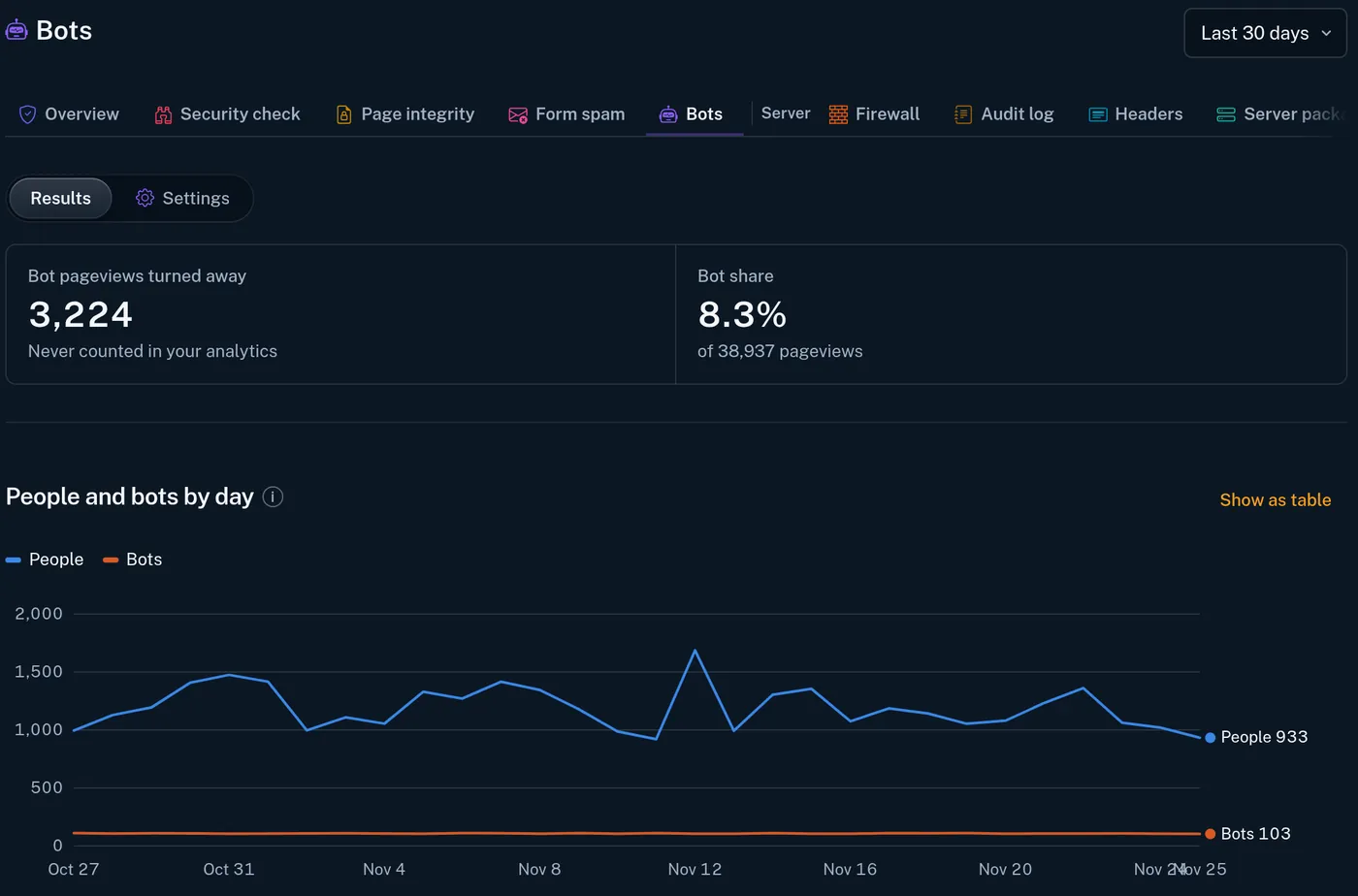
Bots
- Known bots filtered Turned away on arrival and never counted, with why, the pages they hit and where they came from.
- Why a visit looks fake A score from 0 to 100 built from 20 signs, such as “pages opened faster than anyone reads”, shown on each visit.
- Watch it, then decide Open the recording of a suspicious visit, and mark it “Not a bot” when you know better.
- Your call on your numbers Leave suspicious visits out of every report, or keep them in while you see how the score does on your site.
Form spam
- No puzzles Proof of work, a trap field and timing. Invisible, or an “I’m not a robot” tick only for visitors who look automated. On for new sites.
- Every form, logins included Or only the forms you pick. Sites with their own backend can check each answer on the server too.
- A spam folder From Basic planCaught sends kept 30 days with the reason, one click to put one back.
- What spam went for Why each was stopped, the forms it targeted and the pages it was sent from.
Questions people ask
Does the check change anything on my site?
No. Every request only reads. Nothing is submitted and nothing is changed, so it’s safe to run as often as your plan allows.
What do I do with a finding?
Each one says what was found and how to fix it. Fix it and check again: it moves to “Fixed since the last check”. A missing header can be turned on from the finding when our server package is on your site. If it’s a risk you accept, write why and it leaves the grade until someone reopens it.
What does the Free plan get?
The A to F check on one site, run by hand once a month. Basic and Pro run it any time, every week or every month, with an email of what changed.
Will it catch a card skimmer?
It tells you when a new script turns up on your payment pages, or a form starts sending somewhere else. It reports and never blocks, so you decide what to do.
Does the firewall block straight away?
No. It starts as a trial run and shows what it would have stopped. Switch it to block when you’re happy with what you see. It needs our package, plugin or server agent.
Do I need to install anything?
Not for the check, the watched pages, payment scripts, bots, spam or sending your firewall rules to Cloudflare. The firewall, file checks, login alerts, server checks and audit log need our package for Node, Python, PHP, Ruby, Java, .NET or Go, the WordPress plugin or the server agent.
Put a goose on your site.
Get your grade, fix what matters first, and hear when anything changes. See it all