
Competitor tracking
Know when a rival moves.
Follow their prices, pages, reviews, rankings, ads and social accounts, and get told when something changes, without visiting their site every day. Every competitor sits in one table against your own business, and each one has a page with everything that changed lately.
Competitor tracking is on every plan. Reviews, estimated visits, ads, news and social checks use credits, except YouTube.
- 25
- competitors a site
- 12
- kinds of page watch
- 73
- tools spotted on their pages
- 6 hours
- between checks, at the most often
What you get
Anything without a plan label comes with every plan, including Free. The pictures are the real dashboard, from our demo shop with made-up visitors.
On Google
Find out who you’re really up against on Google.
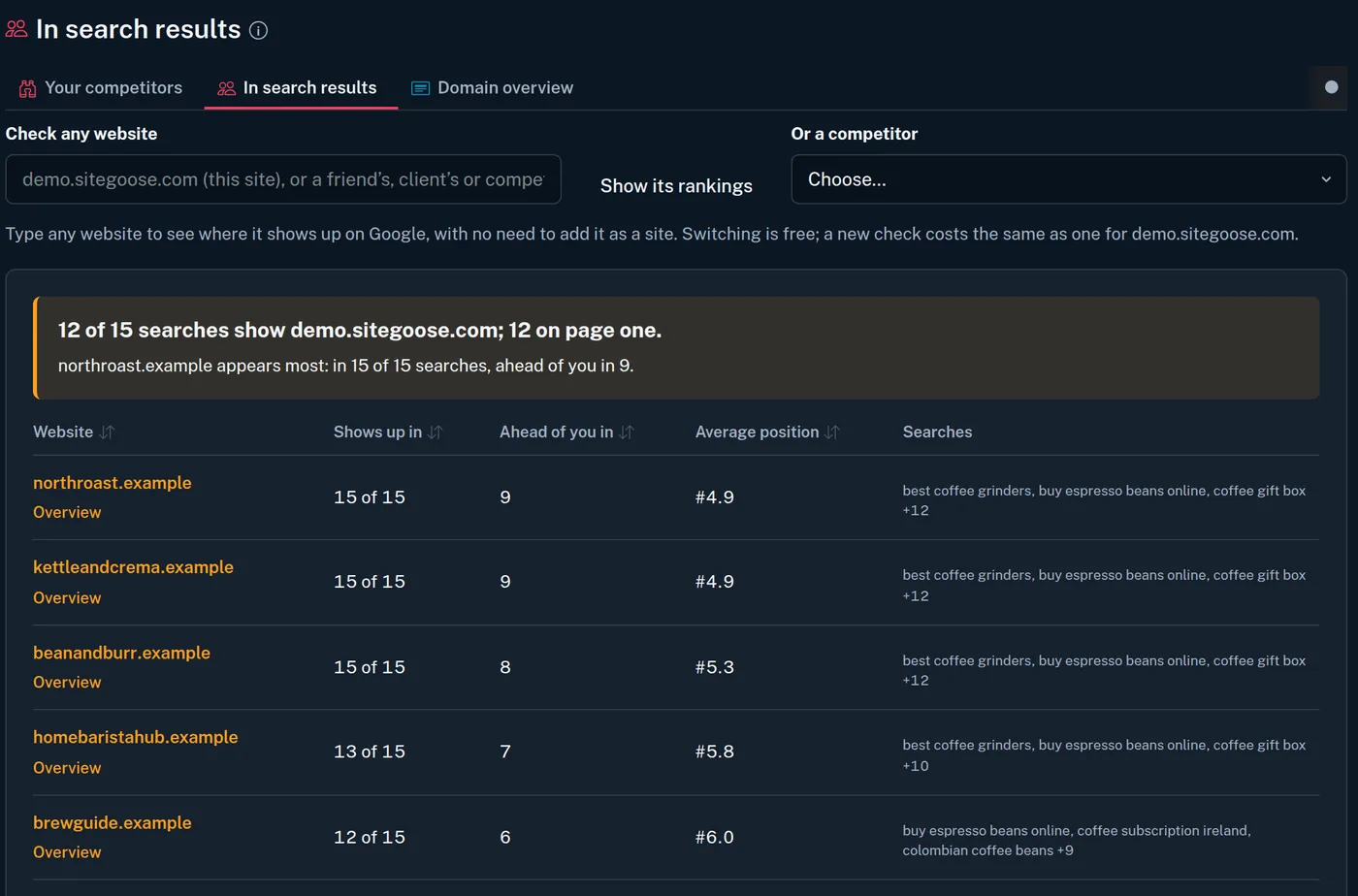
Don’t know who your competitors are? The sites that keep turning up in your searches are listed for you, with how often they rank above you. Add one and its positions are already there, search by search against yours.
Finding them
- In search results Sites that keep appearing in your searches, and how often they beat you. Track any in a click.
- Start with a few phrases Paid per useType a few searches right there and see who shows up.
- Find competitors Paid per useUp to 20 websites that show up on Google for the most of your phrases, with how many you share, their position on them and estimated visits.
- Domain overview Paid per useAny website on one page: estimated visits, top phrases, who links to it (Basic and Pro), the AI answers that cite it and where it shows up in your searches. Each cost is on its button.
Their rankings
- Search by search Each search you track: their position, yours, and where they were before.
- Their history, from day one Positions from your own saved checks, going back before you added them.
- The map and AI answers Their place and rating in Google’s map results, and the AI answers that cite them.
- Estimated visits Paid per useModelled Google visits for you and each rival, to size up the market.
- Their backlinks From Basic planSites linking to them, and links new and lost in 30 days, from a backlinks report.
One competitor
Everything about one rival, against you.
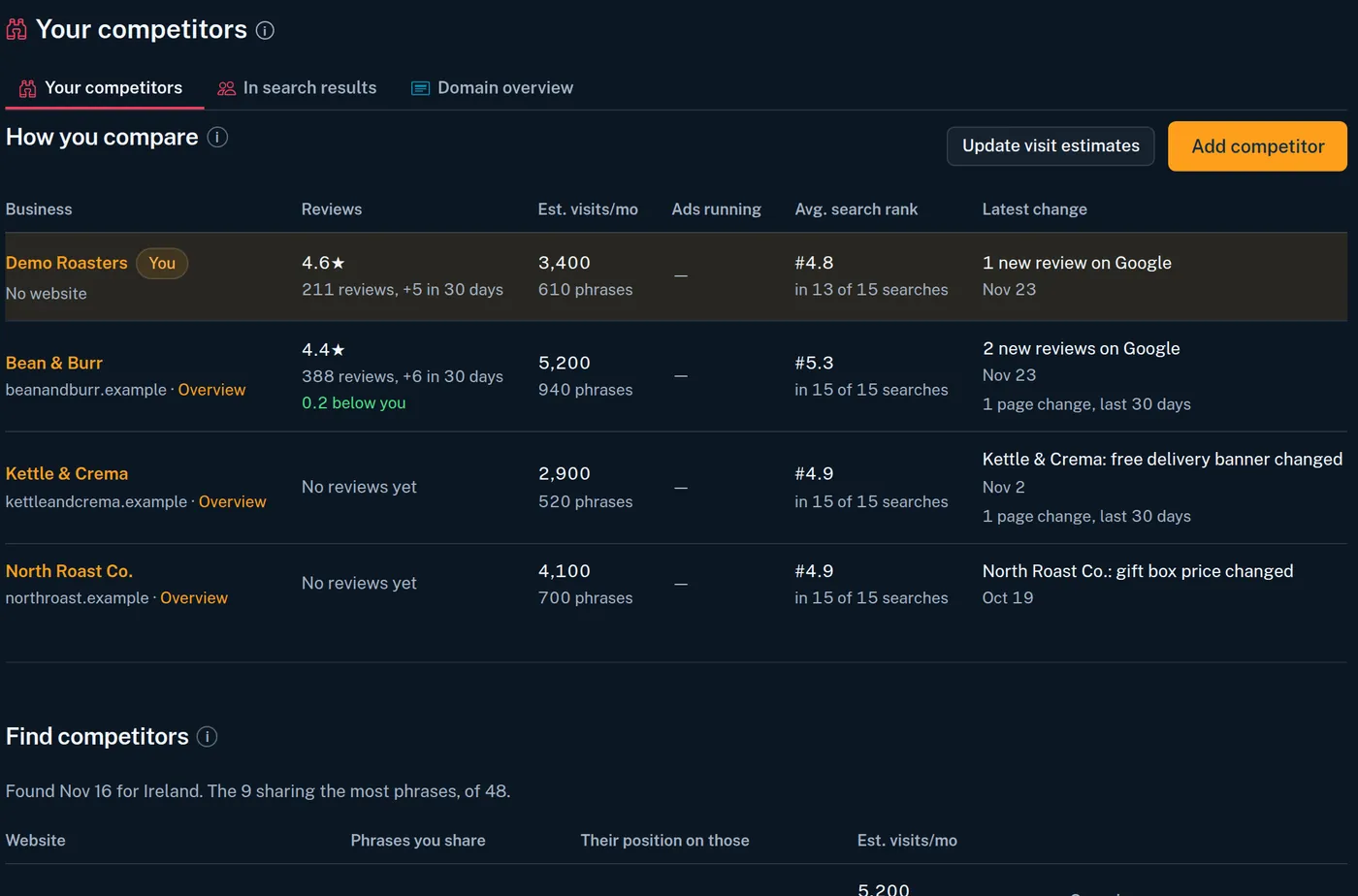
Each competitor gets a page of its own. At the top, their rating, reviews, new reviews this month and average search rank beside yours, coloured by who’s ahead. Below, one timeline of what they changed lately, then a tab for each thing you follow.
The overview
- One table of everyone Each competitor’s reviews, estimated visits, ads running, average search rank and latest change, with your own business on the first row.
- What changed lately Their website, reviews, rating, Google profile, rankings and ads, and new articles about them, newest first.
- The next step offered No website yet, no reviews followed, no page watched: each is one button on their page.
- Your own business too Mark one entry as yours and every competitor is compared with it.
Website changes
“They cut their price”, without checking every day.
Load any page and click what you want watched: a price, a headline, a “Sold out” badge, a list of plans. Or watch the whole page, their new pages, their blog and their set-up. You get an email when it changes, with what it was and what it is now.
On the page
- Click to pick Click anything on their page to watch it. Prices and ratings from the page’s product data are offered too: they rarely break in a redesign.
- A number, a word, a count How much a price went up or down, whether a badge appears, how many products or job openings there are, or which lines of text changed.
- Only changes that matter Set how big a change has to be. Smaller ones add up until they reach it, so nothing is missed.
- Leave parts out On a whole-page watch, click a part to ignore it, such as a date that changes every day.
- Modern sites too Up to 8 watches open the page in a browser, for sites that build it with scripts.
- As often as you need Anything from every 6 hours to once a week.
Off the page
- New and removed pages From their sitemap: a launch, a comparison page, a job ad.
- What they publish New posts from their blog feed, which doesn’t break when the blog is redesigned.
- New subdomains A new app. or status. address from the public certificate logs, often before anything links to it.
- Where it’s hosted A new host, CDN, email provider or nameserver in their DNS records.
- The tools they add 73 tools spotted on their pages. A new Meta pixel usually means they’ve started ads. Started for you when you add a competitor with a website.
Every watch in one list
- Newest change first Narrowed by competitor, by what’s watched, by what changed this week or by name.
- Told when one breaks If a redesign moves what you watched, you get an email and pick it again.
Reviews
Hear what their customers say.
Follow a rival’s reviews and their Google listing, and hear when a low rating lands or their details change. Read their reviews by stars, topic, date or reply, and see what keeps coming up. It works for your own business too.
Their reviews Paid per use
- Google or Trustpilot Find the business by name or a Google Maps link, then follow it. Checked daily.
- Read them your way Filter by stars, topic, date, whether they replied or whether there’s text, and sort by newest or lowest.
- Trends by topic What reviews keep mentioning, and how that moves over time.
- Reviews per month How many come in, and the star breakdown against the month before.
- Alerts Bad news only, every new review, or your own: stars, words a review mentions, or the rating dropping below a line. By email as well, if you like.
Their Google listing Paid per use
- Checked weekly Hours, phone, website, categories, price level, photos and rating, with an alert when any of it changes.
For software Paid per use
- G2 and Capterra Their rating and review count, the newest 10 reviews with likes and dislikes, and alerts on new and low-star reviews.
Questions people ask
How many competitors can I follow?
Up to 25 a site, all in one table with your own business on the first row and the latest change beside each.
I don’t know who my competitors are. Where do I start?
Find competitors lists up to 20 websites that show up on Google for the most of the same phrases as yours, with their estimated visits. Or type a few phrases and see which sites keep showing up and how often they rank above you.
Do I have to wait weeks for their history?
No. Their positions come from your own saved checks, going back before you added them, so a rival added today already has a history.
What can a page watch look for?
Twelve kinds of change, from a price or a piece of text to DNS, a sitemap, a blog feed or new subdomains, checked every 6 hours to weekly. You click what to watch on the page itself.
Are their visit numbers real?
They’re estimates: modelled Google visits, the same way for you and every rival, so you can compare sizes. Never their own analytics.
What uses credits?
Find competitors, the domain overview (what you’ve already saved shows free), reviews, their Google listing, estimated visits, ads, news, and their Facebook, Instagram, LinkedIn and X are paid from your monthly credits. Page watches and YouTube are free.
Put a goose on your site.
Add your first rival and see what they changed this week. See it all
Social, ads and news
See what they promote, and where.
Follow a competitor’s public accounts each week and watch their followers grow or stall. See the ads they run on Meta and Google, and the news written about them. Each is checked when you ask, then weekly only if you follow it.
Their social accounts
Their ads Paid per use
In the news Paid per use