
See where you rank on Google, and what to do about it.
Check where your pages come up for the searches that matter to you, in any country or town, on a phone or a computer. Track them every week, see who’s ahead and why, and get one list of what to fix first.
Try it free: 100 search credits for your first 30 days. After that, credit packs (2,500 credits for $5), or the SEO add-on on Basic and Pro.
- 1.5 credits
- a check, any time you like (about $0.003)
- 0.5 credits
- a week for each search you track (about $0.001)
- 240
- countries, down to the town
- Monday
- email with what went up and down
What you get
The numbers in the pictures are made up. The features are real.
Where you stand
Know if you’re moving up.
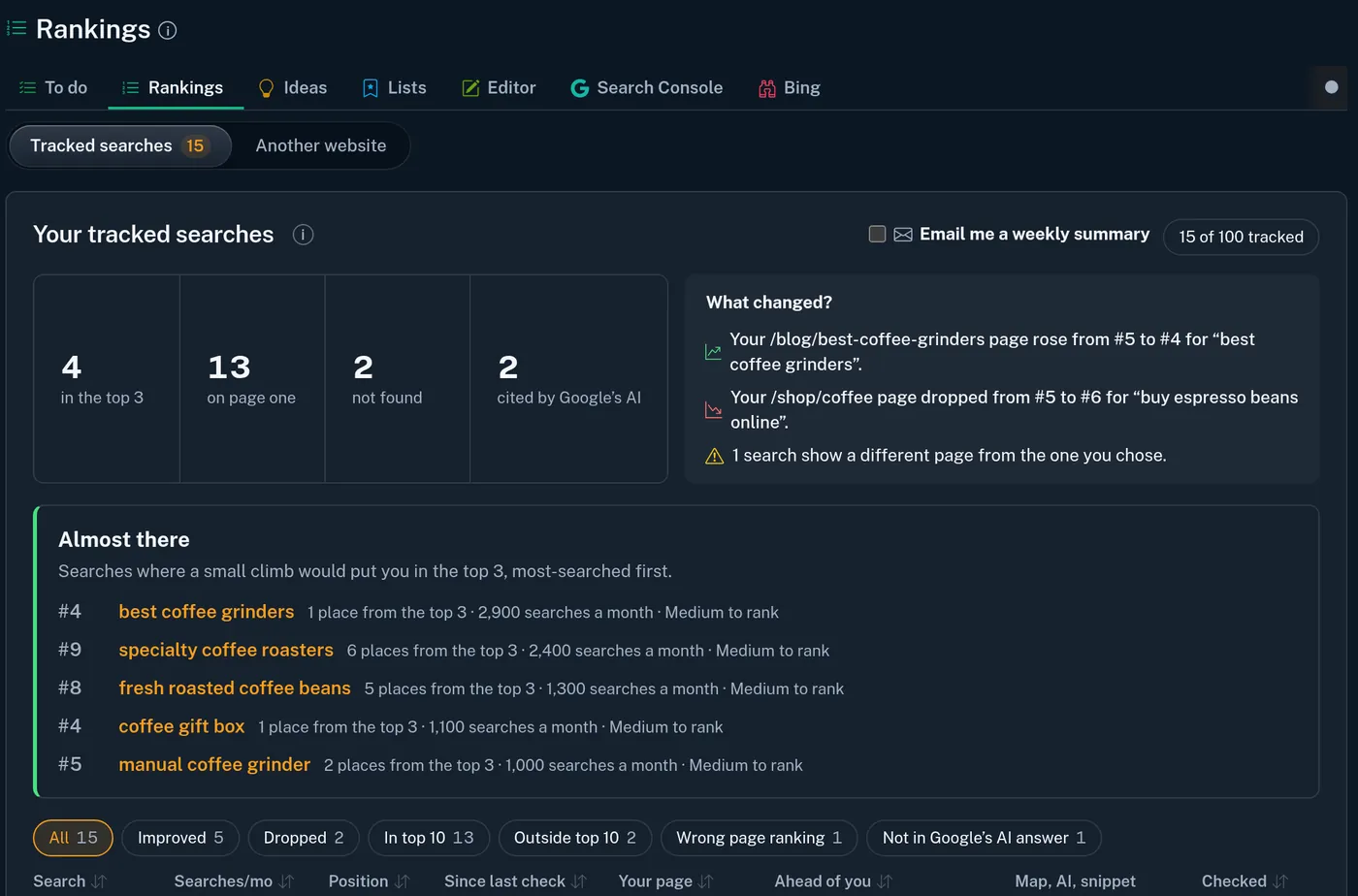
Pick the searches your customers type and where they type them. We check Google and keep the history, so every week you see what moved, which searches are almost in the top 3, and whether the right page is the one ranking.
Check a search Paid per use
- Any country, any town Rankings in London aren’t rankings in Leeds. Check the place your customers are, in their language.
- Phone, computer or both Results differ by device, so check the one your customers use, or both side by side.
- Google or Bing Bing’s results too, which also sit behind Yahoo, DuckDuckGo and Copilot.
- Now, or cheaper in five minutes The price is on the button before you check, and the same check again within 24 hours is free.
- Any website Type a client’s, a prospect’s or a competitor’s website and see where it shows up, without adding it as a site.
Your tracked searches Paid per use
- Tracked weekly Up to 100 searches a site, checked every week, with the history kept.
- Daily for the ones that pay Up to 10 of them checked every day instead, at the same price a check.
- One table Position, change since the last check, monthly searches, the page that ranks and who’s just ahead of you.
- What changed The searches that went up, the ones that dropped, and any that came into or fell out of the top 10.
- Almost there Searches at 4 to 20 with the most people searching: the quickest gains are just below page one or the top 3.
- The right page Set the page you want to rank for each search, and filter for the ones where Google ranks another.
- Several at once Paste a list of searches, see the cost, then check and track them in one go.
Without logging in
- Monday email What went up, what dropped, and anything new in the top 10.
One search, opened
Everything Google showed, not only a number.
Open a search to see your position over time and the whole page of results behind it: who’s ahead, the map, the quoted answer at the top, Google’s AI answer and what people ask next.
Your position
- Position history Every check on a line, and a rival’s line beside yours from the same checks, free.
- Who’s ahead of you The results above you, and any website you want to spot in them.
- Phone against computer The same search on another device or in another country, its first 20 results beside these, your pages highlighted.
The rest of the page
- The map The three businesses Google shows on the map, with their ratings, and your place there over time.
- Featured snippet Who has the answer quoted above the results. Someone else’s while you’re on page one is marked “Snippet to win”, with a button to write the answer.
- Google’s AI answer Whether it cites you, the sources it uses instead, and the answer itself.
- Questions and other searches What people also ask, and the other searches Google suggests, ready to write for.
Why they’re ahead
Turn a position into a to-do list.
Off page one? Six usual reasons are checked in the order worth fixing them, each with a verdict and the next step. Then put your page next to a rival’s, and see what theirs covers that yours doesn’t.
waterproof trail shoes: them 2, you 4
- TitleTheirs names the search, yours doesn’tFix
- Words on the page1,840 against your 620Fix
- Topics they coverSizing, drying, grip on wet rock3 missing
Why isn’t it here?
- Can Google read it? A noindex, a robots.txt rule, a canonical pointing elsewhere or a redirect, and Google’s own answer when Search Console is connected.
- Is there a page for it? Whether a page of yours is made for this search, and which one looks like it.
- Is it too hard for now? How hard the search is, with more specific searches from the same results to go after first.
- Content, links and the map What the pages ahead say that yours doesn’t, who links to them, and whether the map is where the clicks go.
Catch up
- Side by side Your page against a rival’s on what Google reads: title, main heading, words, sections, description, structured data, internal links, image descriptions and phone layout.
- What am I missing? The topics and questions the pages above you cover and yours doesn’t, read as soon as you open the search.
- Draft the fix From Basic planA new title, description, sections and answers for those gaps only, with [brackets] for what only you know. You check it before using any of it.
- Write it in the content editor Open the search in the editor and write the page against Google’s top 10.
- Find the link gap From Basic planThe websites linking to the pages ahead and not to you.
To do
One list of what to fix first.
Everything costing you visits from Google, worst first, from results you already have. At the top, how you’re doing: clicks, times shown, average position and conversions against the four weeks before.
The list
- From every check Searches you’re close on, site audit findings, slow pages, broken links, accessibility and Search Console, on one list.
- A button on each Every item opens the tool with the detail and the fix.
- Nothing to set up first Anything never checked can be started right there, with its cost on the button when it has one.
Search Console and Bing
See which searches bring customers.
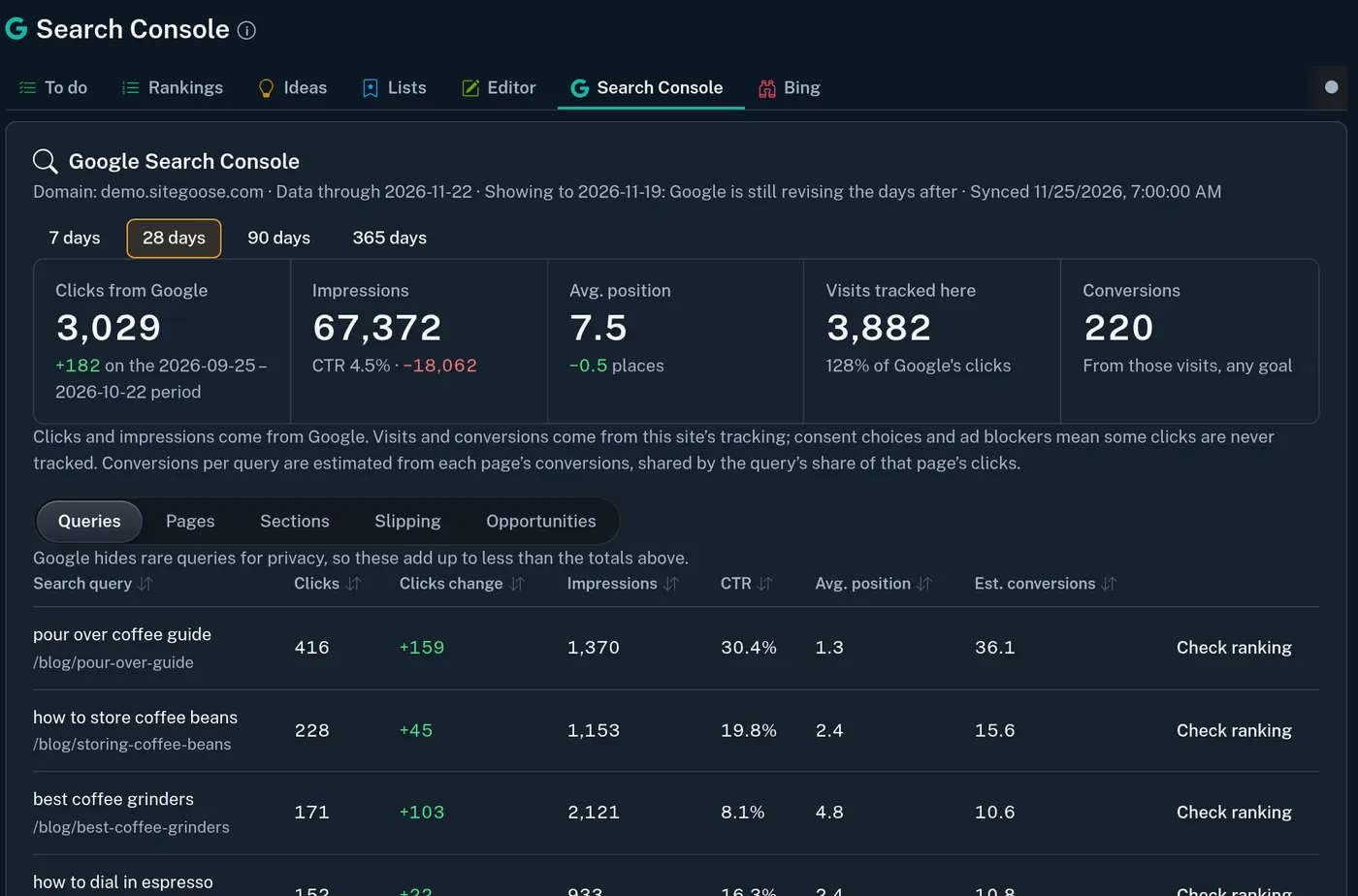
Connect Google Search Console for free. Its clicks and positions sit next to your own visits and sales, so you see which searches bring customers, not just clicks, and which pages are slipping before the clicks go.
Google Search Console
- 16 months of history Real clicks, times shown and positions, by search, by page and by section of the site (all of /blog together).
- Joined to your visits Each search and page with the visits it brought and the sales or sign-ups that followed.
- Pages that went backwards Pages that lost clicks, and pages holding their clicks while sliding down the results, which are the ones still worth catching.
- Almost on page one Searches just off the first page, with about how many more clicks a month each is worth, biggest first.
- Ranking well, clicked rarely Searches you show up high for that people skip, so a better title and description is the fix.
- Check ranking Any search in the report checked on Google in a click, or saved to a keyword list.
Bing Webmaster Tools
- Bing’s own figures Sign in to Bing once: its clicks, searches and positions for your pages, week by week, beside your visits from Bing.
- Send pages to Bing Paste a new or changed address and Bing is asked to crawl it now, up to the day’s allowance Bing sets.
Put a goose on your site.
SEO is one part of it. You also get analytics, page speed, security checks, a firewall, error logging and more. See it all